
In the fast-paced world of printing, maintaining high-quality standards is essential, where accuracy and precision are paramount. The advent of a printing quality inspection system has revolutionized how printing companies ensure top-notch print output. This article delves into the significance of a printing quality inspection system, its key components, and the advantages it brings to the printing process.
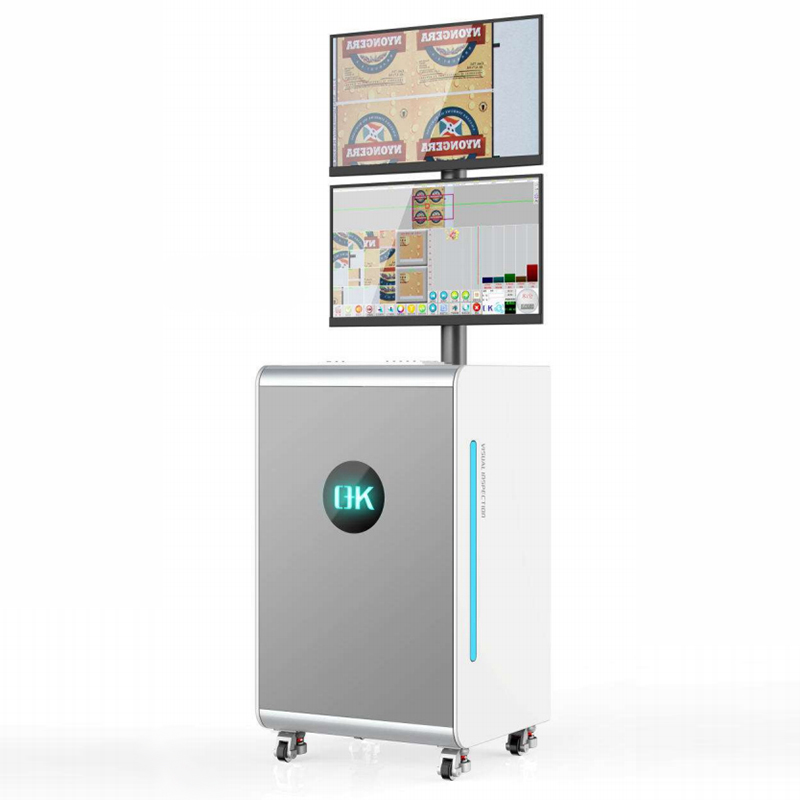
What is a Printing Quality Inspection System?
A printing quality inspection system is a sophisticated software-based solution integrated into the printing process to automatically examine and verify the quality of printed documents. This cutting-edge system conducts real-time evaluations of print samples, comparing them against predetermined quality metrics, using advanced technologies such as computer vision, image processing, and artificial intelligence.
Key Components of a Printing Quality Inspection System:
Camera or Image Sensor:
An integral part of the system, the camera or image sensor captures high-resolution photographs of printed materials, enabling the system to thoroughly assess print quality. Multiple cameras may be strategically positioned to cover various sections of the print for a comprehensive inspection.
Image Processing Software:
At the heart of the system lies the image processing software. It analyzes the images acquired by the camera or image sensor, extracting vital features and properties of the printed materials. Sophisticated algorithms scrutinize the photos for faults, color variations, alignment issues, and other quality-related concerns.
Artificial Intelligence (AI) and Machine Learning (ML):
In modern printing quality inspection systems, AI and ML algorithms play a crucial role. These technologies allow the system to learn from previous print samples, adapt to different print types, and improve its accuracy over time. An AI-powered system enhances its ability to detect and identify flaws, leading to more effective quality control.
Quality Metrics and Thresholds:
The system is configured with quality measurements and thresholds serving as benchmarks for acceptable print quality. These metrics may include color accuracy, alignment, print resolution, and other printing-specific factors. Whenever the actual print quality deviates from these predefined standards, the system notifies the user to take corrective action.
Light Source and Illumination System:
To achieve optimal image capturing, a suitable light source and illumination system are essential. Consistent and controlled lighting conditions are crucial for reliable analysis of printed materials. Depending on the printing method and materials, various lighting strategies like back lighting or diffuse lighting may be employed.
User Interface:
A user-friendly interface simplifies the interaction between operators and the system. The interface monitors the inspection process in real time, displays inspection results, and allows operators to review quality reports. Additionally, operators can make adjustments to system settings, calibration, and quality parameters.
Data Storage and Analytics:
A data storage capability is typically included in a printing quality inspection system to save inspection results and historical data. This information can be utilized for performance analysis, trend detection, and process optimization. Integrated analytical tools can extract valuable insights for continuous improvement.
Integration with Printing Equipment:
The quality inspection system can be seamlessly integrated with the printing equipment or control system, streamlining the printing workflow. This interface enables automatic printing inspection, reducing downtime and optimizing quality control procedures.
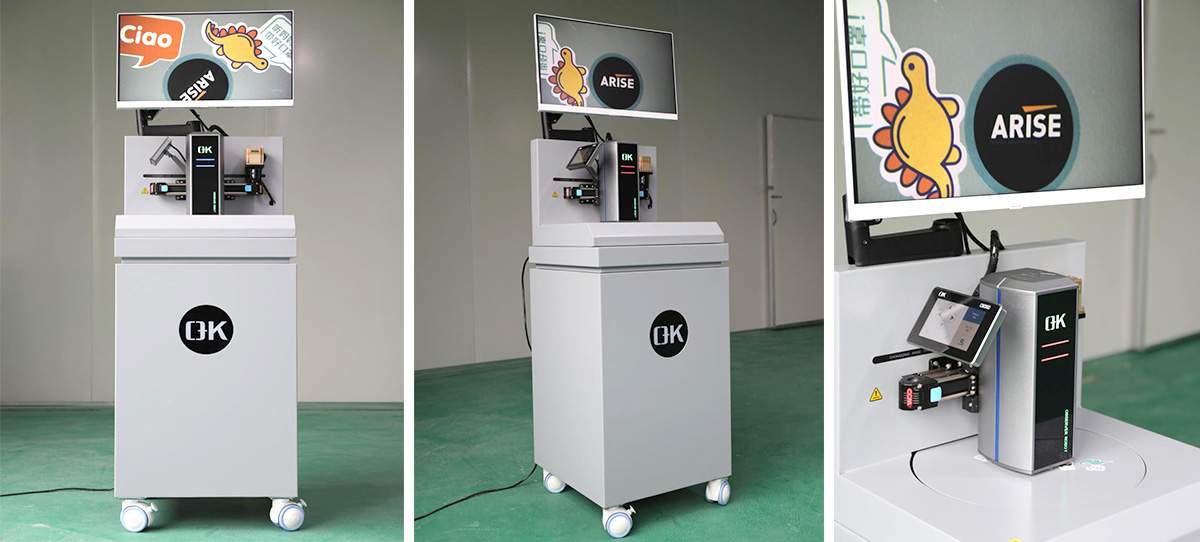
Benefits of a Printing Quality Inspection System:
Improving Printing Quality:
The primary advantage of a quality inspection system is the enhancement of print quality. The system can detect even minor flaws, such as misprints, color variances, streaks, and smudges. By identifying these issues early in the printing process, the system allows for quick corrective action, resulting in flawless print output.
Increasing Productivity:
Automating the quality inspection process with a dedicated system reduces the need for manual examination. This saves time and resources, making printing companies more productive. The system can analyze prints at a much higher speed than human inspectors, thereby expediting the production process.
Waste Reduction:
A printing quality inspection system reduces waste by identifying and rejecting faulty prints at an early stage. This helps avoid the production of poor or unusable prints, which can be costly in terms of materials and time. Waste reduction contributes to cost savings and promotes environmentally friendly printing practices.
Consistent Output:
By using the precision of a quality inspection system, printing companies can maintain consistent print quality across all print runs. The system adheres to preset quality requirements and measurements, eliminating print output variations. This consistency enhances the brand's reputation and customer satisfaction.
Real-time Monitoring and Reporting:
Operators can monitor the inspection process in real time through a user-friendly interface. They can review quality reports, monitor the performance of the printing process, and make swift adjustments if necessary. This proactive approach ensures effective quality control during production.
Enhancing Customer Satisfaction:
Consistently producing high-quality prints can exceed customer expectations. Satisfied customers are more likely to return for future projects and recommend the printing company to others, leading to positive word-of-mouth and business growth.
Continuous Improvement:
A web inspection system for printing quality provides valuable data and insights through analytics. Operators can monitor performance patterns, identify areas for improvement, and optimize printing processes over time. Continuous improvement initiatives result in increased efficiency and quality gains.
In conclusion, maintaining impeccable print quality is crucial for success in the competitive printing industry. A printing quality inspection system, empowered by innovative technology, offers a comprehensive solution to achieve and uphold the highest printing output standards.
Web video inspection systems are innovative solutions that utilize digital imaging technology to capture and analyze real-time video footage for inspection purposes. These systems consist of high-resolution cameras mounted on flexible arms or gantry systems, enabling easy positioning and maneuverability in various environments. In this article, we will delve into the key features, advantages, applications, and importance of web video inspection systems.
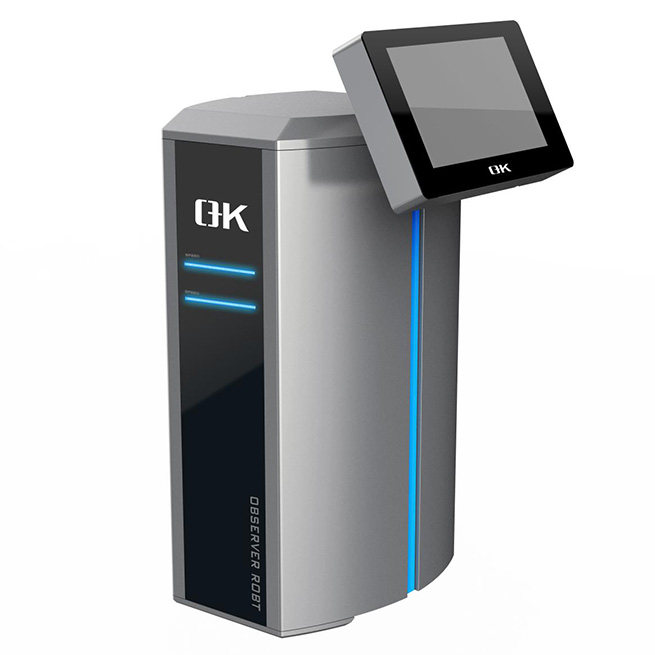
Key Features and Components of Web Video Inspection Systems
High-Resolution Camera: The heart of a web video inspection system is its high-resolution camera. It records detailed video footage, allowing inspectors to thoroughly examine objects or surfaces. The camera's resolution ensures even the smallest flaws or anomalies are easily noticeable and can be investigated.
Flexible Arm or Gantry System: The camera is often mounted on a flexible arm or gantry system, providing mobility and flexibility during inspections. The flexible arm allows for easy placement and adjustment, granting access to hard-to-reach areas or objects of varying shapes and sizes.
Lighting Mechanism: Proper illumination is crucial for accurate inspections. Web inspection camera systems include lighting mechanisms, typically in the form of built-in LED lights. These lights can be adjusted to provide appropriate illumination, improving image quality and ensuring clear visibility of the inspection area.
Real-Time Video Display: A real-time video display, usually shown on a monitor or computer screen, allows inspectors to view the inspection process as it happens. This enables instant feedback and facilitates real-time decision-making. Inspectors can evaluate video footage, zoom in on specific areas, and make adjustments on the spot.
Control Unit: A control unit oversees the camera and other components of the web inspection system. It provides inspectors with control over camera movements, lighting conditions, and access to additional features or functionalities offered by the system.
Software and Recording Capability: Web inspection systems include dedicated software that enhances functionality and user convenience. Inspectors can capture photos or record video footage during inspections. This capability is valuable for documentation, further analysis, report generation, and maintaining inspection records for future reference.
Remote Access and Control: Web video inspection solutions often offer remote access and control capabilities. Inspectors can control the system from a central location, increasing flexibility and convenience. Remote access is particularly useful in hazardous or inaccessible inspection areas or when specific expertise is required.
Portability and Durability: Portability and durability are critical considerations for web video inspection equipment. These systems are lightweight and compact, making them easy to transport and suitable for various settings. They are constructed with rugged and durable materials to withstand demanding work conditions, ensuring long-term reliability.
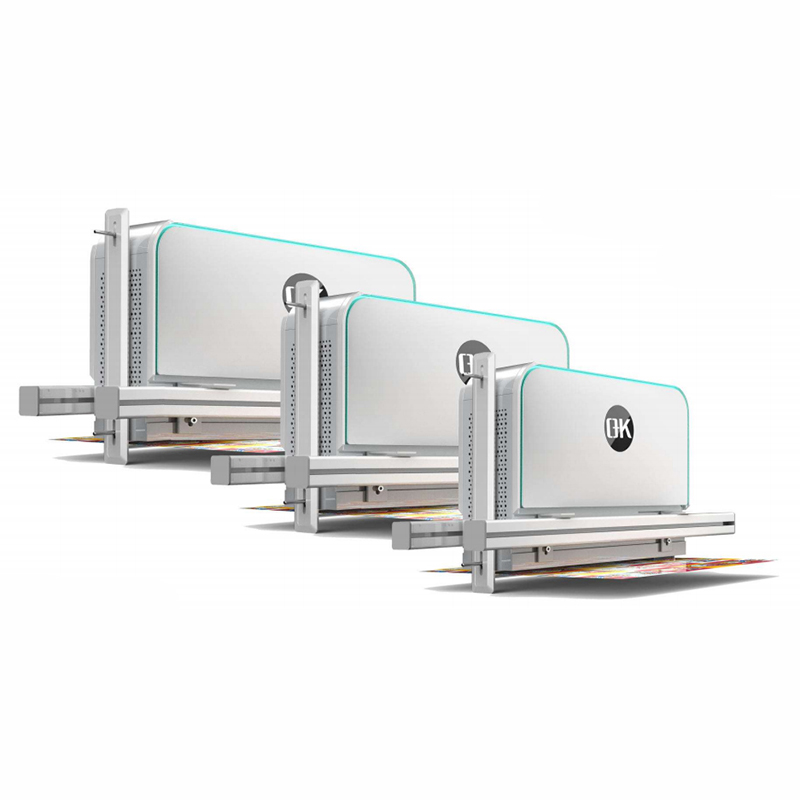
Key Advantages of Web Video Inspection Systems
Enhancing Accuracy: The high-resolution camera and real-time video display of web video inspection systems enable inspectors to observe and analyze details with exceptional clarity. This results in more accurate detection and evaluation of flaws, abnormalities, or quality issues. Improved accuracy reduces the risk of overlooking critical concerns, ensuring thorough inspections and upholding high-quality standards.
Increasing Efficiency: Web video inspection systems streamline the inspection process, leading to increased efficiency. The flexibility of the camera's arm or gantry system allows inspectors to quickly and easily position the camera, providing access to areas that would otherwise be challenging or time-consuming to reach. This saves time and labor compared to traditional inspection methods, ultimately boosting productivity.
Improving Documentation and Reporting: Web video inspection systems often include software that allows inspectors to capture photos or record video footage. This documentation serves as a valuable resource for additional analysis, quality assurance, and reporting. Digital documentation simplifies the process, enhances traceability, and enables comprehensive reporting to stakeholders.
Versatility and Adaptability: Due to their flexible arm or gantry system and customizable lighting mechanisms, web video inspection systems are versatile and adaptable to diverse inspection settings. Inspectors can easily adjust camera angles, illumination intensity, and position to enhance visibility and image quality, catering to various inspection requirements. This adaptability allows the system to be utilized across multiple industries and inspection applications.
Cost Saving: Web inspection camera systems offer cost savings in several ways. They reduce the time and effort required to conduct inspections by enhancing efficiency. Additionally, their ability to quickly identify and rectify flaws or abnormalities reduces the risk of costly rework or product recalls. The documentation capabilities of the system are also valuable for quality assurance and dispute resolution.
Enhancing Safety: By reducing the need for direct physical contact with hazardous chemicals or environments, web inspection vision systems improve safety. Remote inspection capabilities provide a safer working environment, especially in situations where employees may be exposed to hazards or face limited access.
Continuous Improvement and Analysis: The ability to record video footage during inspections enables thorough analysis and evaluation. Inspectors can review recorded footage, assess trends, and identify opportunities for process or product improvement. This helps companies enhance their overall quality control methods and promotes continuous improvement initiatives.
Wide Applications of Web Video Inspection Systems
Manufacturing: Inspecting product quality, identifying flaws, and monitoring manufacturing processes.
Automotive: Examining components, detecting manufacturing or assembly defects, and ensuring compliance with quality requirements.
Infrastructure and Construction: Assessing the condition of structures, inspecting pipelines, and maintaining the integrity of critical infrastructure.
Aerospace: Inspecting airplane components, evaluating surface conditions, and identifying structural flaws.
Quality Control: Verifying product specifications, inspecting packaging and printing quality, and ensuring adherence to industry regulations.
In conclusion, the web video inspection system is an indispensable tool for modern inspections, providing unparalleled precision, efficiency, and adaptability. With advanced imaging technology, real-time video displays, and flexible positioning capabilities, inspectors can detect flaws and irregularities with exceptional accuracy. These systems enhance productivity, reduce costs, and ensure the highest level of quality control across diverse industries. Embracing this technology is essential for achieving inspection excellence, driving improvements, and maintaining a competitive edge in today's fast-paced business environment.
Over the years, the printing industry has witnessed significant advancements, with technology playing a crucial role in transforming printing processes. One such technological breakthrough that has gained tremendous traction is the web guiding system. Web guiding systems have become a vital tool for the printing industry, offering improved precision, higher production efficiency, cost savings, flexibility, quality assurance, connectivity with digitalization, and a wide range of applications.
What is a Web Guiding System?
A web guiding system, also known as a web guiding control system or web alignment system, is a technology used in various industries, including printing, packaging, and paper manufacturing. These systems are designed to accurately control the position and alignment of a moving web of material during the manufacturing process. A web refers to a continuous sheet of material, such as paper, film, or fabric, that is unwound from a roll and subjected to various treatments or printing processes.
Web guiding systems can be implemented in different ways, depending on the specific requirements of the manufacturing process. They utilize edge guide sensors, line sensors, or vision systems to determine the position of the web. Actuators, such as mechanical guides, steering rollers, or motorized actuators, are then used to adjust the web's position based on the sensor feedback.

Why are Web Guiding Systems Important in the Printing Industry?
Enhanced Precision and Accuracy: Web guiding systems address alignment issues during the printing process. They ensure precise color and image registration, minimizing waste and enhancing print quality. These systems enable printers to consistently produce aligned and high-quality prints, even at high speeds, by accurately guiding the web through the printing machine.
Increased Production Efficiency: Downtime and setup time can significantly impact productivity in the printing industry. Web guiding systems reduce these interruptions by quickly correcting any web alignment changes. This allows for faster printing speeds, fewer manual interventions, and uninterrupted operation, leading to increased production efficiency.
Cost Savings: Web guiding systems offer substantial cost savings in an industry where material waste and rejections can greatly impact profitability. These technologies enhance operational efficiency by reducing misprints, minimizing material waste, and maximizing resource utilization. Additionally, the prompt detection and correction of web misalignments help save costly rework and reprinting expenses. Furthermore, the reduced maintenance and repair requirements of printing equipment contribute to cost savings.
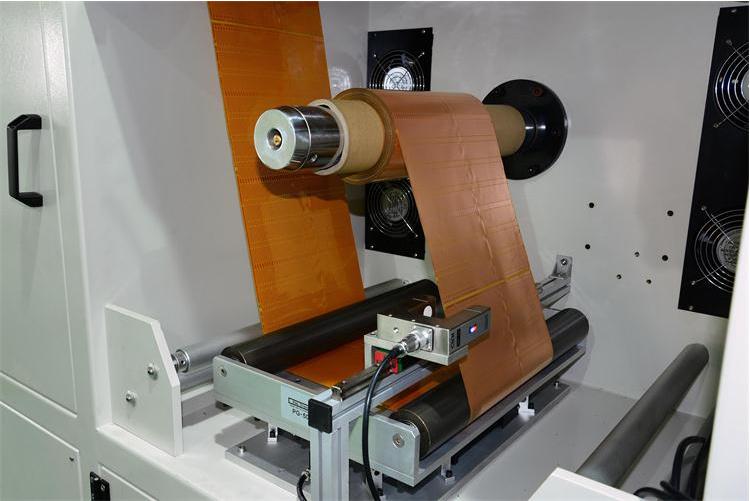
Flexibility and Adaptability: The printing industry encompasses various substrates, printing techniques, and formats. Web guiding systems effectively handle these complexities. They accommodate different web widths, adapt to diverse formats, and facilitate quick changeovers regardless of the substrate type or printing method used. Their flexibility and adaptability enable printers to efficiently meet evolving customer demands.
Quality Assurance: Consistency and quality are paramount in the printing business. Web guiding systems play a critical role in ensuring print consistency and repeatability. These technologies eliminate flaws such as creases, misalignments, and print irregularities, ensuring that every printed product meets the highest standards. As a result, customer satisfaction increases, and printing companies enhance their reputation.
Integration with Digitalization: As the printing industry embraces digitalization, web guiding systems seamlessly integrate with digital workflow systems. They provide real-time monitoring and control, allowing operators to make changes on the fly. This integration improves overall operational efficiency and productivity by enabling data analysis, process optimization, and predictive maintenance.
Wide Application Range: Web guiding systems find applications in various printing sectors, including labels, packaging, newspapers, and more. They are compatible with different printing technologies, such as flexography, gravure, and offset printing. Furthermore, these systems adapt to a wide range of printing conditions, including varying printing speeds, tension requirements, and web qualities.
In summary, web guiding systems play a crucial role in numerous industrial printing machine applications that rely on continuous web processing to achieve optimal print quality, reducing waste, increasing production efficiency, and ensure smooth operation. As the industry continues to evolve, web guiding systems will play an even more significant role in shaping its future, ensuring optimal performance, and delivering superior print products.
Web guiding systems play a vital role in various industries, ensuring precise alignment and control of materials throughout manufacturing operations. With advancements in technology, online guiding systems have witnessed remarkable innovations, enhancing their accuracy, efficiency, and adaptability. This article explores industry trends and future breakthroughs in web guiding control systems that are reshaping the manufacturing landscape.
Industry Trends of Web Guiding Systems:
Vision-Based Web Guiding Systems:
Traditional systems relied on mechanical sensors and guides for alignment. However, vision-based systems have emerged as a significant breakthrough. These systems employ cameras and image processing algorithms to analyze the web's position in real-time, enabling swift and precise adjustments. The result is reduced waste, increased production efficiency, and the ability to quickly identify flaws or irregularities in the web for corrective action.
Machine Learning and Artificial Intelligence:
The combination of machine learning (ML) and artificial intelligence (AI) has revolutionized web guiding control systems. ML algorithms can identify potential misalignments and autonomously make corrections based on past data and patterns, reducing the need for human intervention. AI-powered systems adapt to different materials and manufacturing environments, continuously learning and optimizing the guiding process. These technologies offer superior precision, consistency, enhanced product quality, and reduced downtime.
Sensor Integration and Feedback Control:
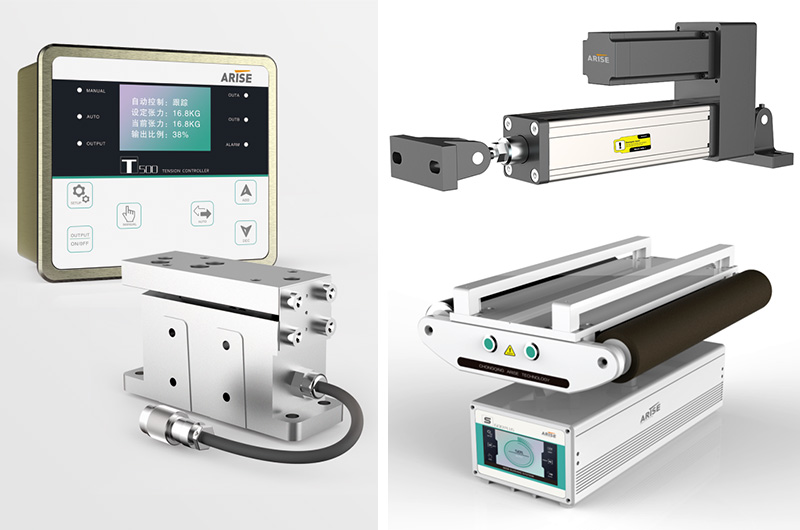
Modern web guide sensors and feedback control mechanisms have made web guiding machines more sophisticated. Capacitive, ultrasonic, and laser sensors are employed to accurately guide the web throughout the production process. Real-time feedback from these sensors enables quick modifications and ensures continuous alignment. Closed-loop control systems enable precise tension control, compensating for speed variations and minimizing web-related issues like wrinkles or breaks.
Non-Contact Web Guiding:
Non-contact web guiding systems have gained popularity in industries where material delicacy or contamination risks are a concern. These systems guide the web without physical contact, utilizing air, electrostatic forces, or electromagnetic fields. Non-contact guiding reduces the possibility of damage or contamination, which is crucial in industries such as food processing, pharmaceuticals, and electronics manufacturing. The demand for non-contact solutions is expected to rise as the industry prioritizes product quality and cleanliness.
Integration with Industry 4.0 and Industrial IoT:
Web guiding equipment is becoming an integral part of the broader Industry 4.0 ecosystem. By integrating with Industrial Internet of Things (IIoT) platforms, these systems can collect and analyze vast amounts of data, enabling predictive maintenance and optimized manufacturing operations. Web alignment systems communicate in real-time with other machines and systems, facilitating seamless coordination and automated modifications across the production line. This integration enhances overall efficiency, reduces downtime, and enables proactive decision-making.

Future Innovations of Web Guiding Systems:
The future holds even more promising innovations for web guiding systems:
Advanced Material Compatibility:
Web guiding systems will continue to evolve to support a wider range of materials, including flexible substrates, thin films, and complex composites. This expansion will benefit emerging sectors such as flexible electronics and renewable energy, allowing for accurate web guiding in their manufacturing processes.
Enhanced Sensing Technologies:
Sensor technology will further evolve, providing greater precision, faster response times, and increased compatibility with various materials. Advanced web guide sensors may incorporate multi-dimensional measurements, enabling comprehensive web analysis and control.
Augmented Reality (AR) Interfaces:
AR interfaces can offer real-time guidance and visual overlays for operators, simplifying and streamlining web guiding adjustments. These interfaces can display essential information such as web position, tension, and suggested modifications, enhancing operator productivity and reducing human error.
Collaborative Robots:
Combining web guide control systems with collaborative robots opens new possibilities for automation. Collaborative robots can assist human operators in web directing tasks, improving productionefficiency and productivity. They can also enhance safety by performing repetitive or hazardous activities.
In summary, the evolving nature of web guiding system is transforming industrial processes across various sectors. Vision-based systems, machine learning algorithms, advanced sensors, non-contact technologies, and integration with Industry 4.0 are driving increased accuracy, efficiency, and adaptability. As web guiding machines continue to expand and integrate with cutting-edge technology, we can expect further automation, improved material compatibility, advanced sensing capabilities, and increased production efficiency. These innovations will result in reduced waste, enhanced product quality, and establish web guiding systems as a crucial component in modern manufacturing operations.
Web guide systems play a vital role in various industries by ensuring precise alignment and management of webs during manufacturing processes. However, like any complex system, they can encounter challenges that hinder operations. This comprehensive guide provides step-by-step troubleshooting methods for common issues in a web guide system, helping organizations maintain maximum performance. By understanding these challenges and implementing appropriate troubleshooting techniques, companies can minimize downtime, improve productivity, and ensure smooth operation.
Troubleshooting Misalignment and Drift in a Web Guide System:
Check Sensor Calibration: Begin by verifying the calibration of the sensors. Ensure they are correctly aligned and calibrated according to the manufacturer's instructions. If necessary, recalibrate the sensors to ensure accurate detection and measurement of the web's position.
Check Roller Alignment: Improper roller alignment can cause misalignment and drift. Inspect the rollers and reposition them if needed. Align the rollers parallel to each other and perpendicular to the web's path.
Inspect Mechanical Components: Examine the mechanical components of the web guiding system, such as rollers, bearings, and guides. Look for signs of damage, wear, or contamination. Replace any worn-out or damaged components and clean debris or contaminants that may interfere with the web's movement.
Troubleshooting Tension Variations in a Web Guide System:
Check Roller Tensioning: Improper roller tensioning often leads to tension variations. Ensure the tensioning mechanisms are correctly adjusted based on the recommended tension settings for the specific web material. Consult the system's documentation for proper tensioning guidelines.
Maintain Consistent Material Feed: Inconsistent material feed can cause tension variations. Check that the material is being fed consistently and smoothly through the guiding system. Inspect the material path for blockages or irregularities and remove them if necessary.
Inspect Roller Surfaces: Examine the roller surfaces for abnormalities or damage that could affect web tension. Ensure the rollers are clean and free of debris or adhesive buildup. Replace any broken or worn-out rollers to maintain proper tension management.
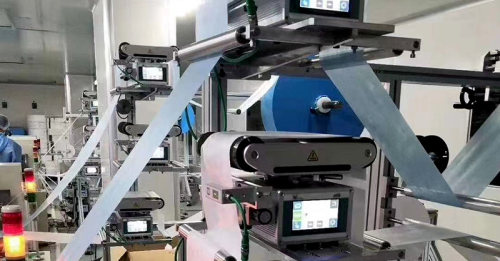
Install Automatic Tension Control Systems: Consider installing an automatic web tension controller that monitors and adjusts tension in real-time. These systems utilize feedback sensors and control algorithms to maintain constant tension throughout the manufacturing process.
Troubleshooting Sensor Malfunctions in a Web Guide System:
Clean the Sensors: Sensors can accumulate dirt, dust, or debris over time, resulting in false readings. Use appropriate cleaning solutions and lint-free materials to clean the sensors. Take care not to damage or misalign the sensors during the cleaning process.
Check Sensor Alignment: Ensure the sensors are properly aligned with the web path. Confirm that the sensors are positioned perpendicular to the web's direction and parallel to each other. Make any necessary adjustments to achieve correct sensor positioning.
Verify Electrical Connections: Examine the connections between the sensors and the control system. Ensure the connections are secure and free from corrosion or loose wires. Test the sensor signals to ensure they are correctly transmitted to the control system.
Perform Sensor Calibration: Follow the manufacturer's instructions to calibrate the sensors. Calibration helps establish accurate detection thresholds and ensures consistent performance. Regularly scheduled sensor calibration is essential for reliable and precise web guiding.
Troubleshooting Control System Errors in a Web Guide System:
Verify Software Setups: Review the control system's software setups and settings. Ensure the parameters and thresholds are properly configured according to the specific requirements of the manufacturing process. Consult the system's documentation or contact technical support for assistance with proper configuration.
Check Electrical Connections: Inspect the electrical connections between control system components, such as sensors, actuators, and power supplies. Faulty or loose connections can cause control system errors. Repair or replace any damaged wiring or connectors and secure any loose connections.
Update Software: If your web guiding system has firmware or software, check for available updates from the manufacturer. Outdated software versions may contain bugs or compatibility issues. Regularly updating the software can improve system stability and performance.
Consult System Documentation and Technical Support: If control system errors persist, refer to the system documentation or contact technical support for assistance. Provide detailed information about the observed issues, system configurations, and the troubleshooting steps taken. Technical support can provide customized advice based on your equipment's model and configuration.
Troubleshooting Inadequate Operator Training of a Web Guide System:
Comprehensive Training Programs: Implement comprehensive training programs that cover web guidance system operation, maintenance, and troubleshooting. Ensure operators understand system components, parameter modifications, error interpretation, and routine maintenance procedures.
Ongoing Training and Refresher Courses: Provide continuous training and refresher courses to keep operators updated on system improvements and best practices. Educate operators about system upgrades, new features, and troubleshooting strategies. Regular training sessions can enhance operator knowledge and confidence in efficiently managing the web guide control system.
In summary, understanding how to troubleshoot common issues in a web guide system is crucial for maintaining optimal performance and minimizing production interruptions. By utilizing proactive troubleshooting methods, businesses can harness the full potential of their web guiding systems, improving productivity, reducing downtime, and enhancing overall operational efficiency.