
Web tension control is crucial for industries processing materials like paper, film, foil, and textiles. Consistent tension ensures high-quality output, reduces waste, and optimizes production efficiency. Tension amplifiers play a pivotal role in these systems by enhancing the accuracy and stability of tension measurements. This article delves into the benefits and best practices for integrating tension amplifiers into web tension control systems.

Understanding Web Tension Control
Web tension control involves managing the force applied to a continuous web of material during processing. Precise control prevents issues like wrinkling, stretching, and tearing, which can compromise product quality and lead to increased waste. Effective web tension control systems often employ a combination of sensors, amplifiers, and controllers.

The Role of Tension Amplifiers
Tension amplifiers enhance signals from tension sensors or load cells, converting mechanical force into precise electrical signals. These signals are used by control systems to adjust and maintain the correct tension. Tension amplifiers are crucial for accurate and reliable web tension control, especially in complex and high-speed production environments.
Integrating Tension Amplifiers: Key Considerations
Compatibility: Ensure compatibility with existing sensors, controllers, and actuators.
Calibration and Maintenance: Establish a regular calibration schedule and implement maintenance routines.
Environmental Factors: Select industrial-grade amplifiers designed to withstand harsh conditions.
Signal Quality: Utilize shielded cables, proper grounding, and amplifiers with built-in filtering.
Flexibility and Scalability: Choose amplifiers with adjustable settings and consider future expansion.
Training and Expertise: Invest in comprehensive training programs for staff.
Cost and Budget: Conduct a cost-benefit analysis to balance initial investment with long-term operational costs.

Solutions for Successful Integration
Comprehensive System Assessment: Evaluate the existing system to identify compatibility issues and plan accordingly.
Customization and Configuration: Select amplifiers with customizable settings to match specific needs.
Robust Design and Durability: Choose amplifiers with rugged enclosures, temperature compensation, and vibration resistance.
Advanced Signal Processing: Opt for amplifiers with advanced signal processing capabilities.
Regular Training and Updates: Implement ongoing training programs for personnel.
Long-Term Support and Service: Establish a relationship with the manufacturer or supplier for support and service.
Conclusion
Integrating tension amplifiers into web tension control systems offers numerous benefits, including enhanced accuracy, improved stability, and seamless integration with modern control systems. By addressing the considerations outlined in this article, industries can achieve precise and reliable web tension control, ensuring high-quality output and optimized production efficiency.
Web inspection systems play a critical role in monitoring continuous materials like paper, plastic, textiles, and metals for defects and irregularities, ensuring high product quality. The integration of remote monitoring and diagnostics into these systems further enhances their capabilities, offering real-time oversight, improving maintenance procedures, and minimizing downtime. This article delves into the importance, benefits, and implementation strategies for remote monitoring and diagnostics in web inspection systems.
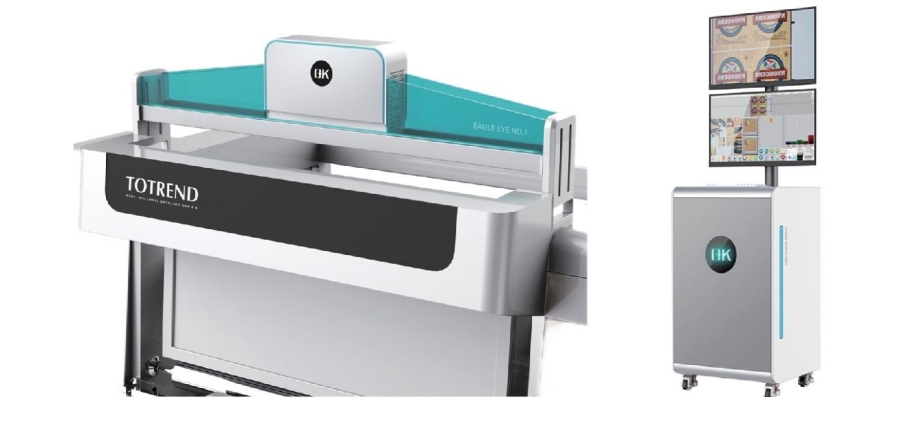
Implementation of Remote Monitoring and Diagnostics in Web Inspection Systems
Implementing remote monitoring and diagnostics in web inspection systems involves the integration of various technologies and methodologies to facilitate real-time monitoring, fault detection, and diagnostics from remote locations.
System Architecture
Hardware Components
Sensors and Cameras: High-resolution cameras and a variety of sensors (e.g., thickness, temperature, tension) should be installed along the web inspection line to capture detailed data.
Edge Devices: Utilize edge computing devices to preprocess data locally before transmitting it to the cloud or remote servers.
Connectivity: Ensure reliable connectivity via wired or wireless networks (e.g., Ethernet, Wi-Fi, 4G/5G).
Software Components
Data Acquisition System (DAS): Implement a DAS to collect and process data from sensors and cameras in real-time.
Remote Monitoring Software: Develop or integrate software platforms that enable remote access to inspection data, visual feeds, and system status.
Cloud Storage and Computing: Leverage cloud services for data storage, processing, and analytics.
Data Transmission and Storage
Secure Data Transmission
Encryption: Apply encryption protocols (e.g., SSL/TLS) to secure data during transmission.
VPN: Implement Virtual Private Networks (VPNs) to ensure secure remote access.
Data Storage
Cloud Storage: Store inspection data in the cloud for scalability and ease of access.
Redundancy: Implement data redundancy strategies to prevent data loss.
Real-Time Monitoring
Dashboard Development
Custom Dashboards: Create customizable dashboards that display key performance indicators (KPIs), real-time data, and alerts.
Visualization Tools: Employ graphical tools to visualize data trends, anomalies, and inspection results.
Alerts and Notifications
Automated Alerts: Configure automated alerts for deviations, anomalies, and faults.
Notification Channels: Use multiple notification channels (e.g., email, SMS, mobile apps) to ensure timely alerts.
Diagnostics and Analysis
Machine Learning and AI
Predictive Analytics: Implement machine learning algorithms to predict potential faults based on historical and real-time data.
Anomaly Detection: Utilize AI techniques to detect anomalies that signal potential issues.
Diagnostic Tools
Root Cause Analysis: Develop tools for root cause analysis to identify and address the underlying causes of faults.
Decision Support Systems: Utilize decision support systems to provide actionable insights and recommendations.
Remote Control and Intervention
Remote Control Capabilities
Remote Adjustments: Enable remote adjustments of inspection system parameters (e.g., camera focus, sensor calibration) to optimize performance.
Automated Corrections: Implement automated correction mechanisms that can be triggered remotely based on diagnostic results.
Security Measures
Access Control: Introduce robust access control mechanisms to restrict remote access to authorized personnel only.
Audit Trails: Maintain audit trails of remote access and interventions for accountability.
Integration with Enterprise Systems
ERP and MES Integration
Data Integration: Integrate inspection data with Enterprise Resource Planning (ERP) and Manufacturing Execution Systems (MES) for comprehensive workflow management.
Real-Time Updates: Ensure real-time updates and synchronization between web inspection systems and enterprise systems.

Training and Support
Training Programs
Remote Training: Develop remote training programs for operators and technicians to familiarize them with the remote monitoring and diagnostics system.
User Manuals and Documentation: Provide detailed user manuals and documentation for troubleshooting and system operation.
Technical Support
24/7 Support: Offer round-the-clock technical support to address any issues that may arise with the remote monitoring system.
Remote Assistance: Utilize remote assistance tools to provide real-time support and troubleshooting.
Conclusion
Remote monitoring and diagnostics for web inspection systems represent a significant advancement in manufacturing technology. By leveraging real-time data collection, advanced analytics, and predictive maintenance, companies can enhance product quality, increase operational efficiency, and achieve substantial cost savings. As industries continue to evolve, the integration of remote monitoring and diagnostics will undoubtedly become a standard practice, driving innovation and competitiveness in the manufacturing sector.
The user interface (UI) and usability of web guiding equipment are crucial components in ensuring efficient and precise operations across various industries. This article delves into the significance of user interface and usability in web guiding equipment, emphasizing key design principles and best practices.

Key Design Principles for User Interface in Web Guiding Equipment
The user interface of web guide system equipment significantly impacts the ease of use, operational efficiency, and overall user experience.
Simplicity and Clarity
Intuitive Navigation: The user interface should be designed with a clear and straightforward navigation structure, allowing users to find and access functions effortlessly, without the need for multiple steps.
Minimalism: Avoid overloading the interface with unnecessary elements. Keep screens uncluttered by including only essential components to prevent operator confusion.
Clear Labels: Use concise and unambiguous labels for buttons and controls to minimize misunderstandings and operational errors.
Consistency
Uniform Layouts: Ensure that the layout is consistent across different screens and functions. This helps users predict where to find specific controls or information, reducing the learning curve.
Standard Controls: Utilize standard control elements like buttons, sliders, and icons consistently throughout the interface. Familiar controls contribute to easier system navigation.
Feedback and Responsiveness
Real-Time Feedback: Provide immediate feedback for user actions, ensuring that changes made by the operator are reflected in real-time.
Status Indicators: Incorporate visual indicators, such as color changes, progress bars, or icons, to display the status of operations and highlight any errors or warnings, enabling operators to assess the system’s condition quickly.
Accessibility
Easy-to-Read Fonts: Select legible fonts with appropriate sizing to ensure readability from a distance, avoiding overly stylized fonts that may be difficult to read.
Contrast and Color Use: Maintain sufficient contrast between text and background colors. Use color coding thoughtfully to convey information, while considering color blindness.
Customization and Flexibility
Adaptable Interfaces: Allow users to customize the interface to their preferences or the specific requirements of different tasks. This can include adjusting layouts, changing color schemes, or configuring shortcuts.
Scalable Design: Design the UI to be scalable, adapting to different screen sizes and resolutions, ensuring a consistent user experience across various devices.
Safety and Error Prevention
Error Prevention: Implement features that help prevent errors, such as confirmation prompts for critical actions and input validation to avoid invalid entries.
Emergency Controls: Ensure that emergency stop buttons and clear instructions for handling emergencies are easily accessible and prominently placed.
Training and Support
Integrated Help: Embed help guides and tooltips within the UI to assist users in understanding functions and troubleshooting issues.
Training Modes: Provide a training mode that allows new users to familiarize themselves with the system without affecting actual operations, helping to build confidence and competence.
Performance and Efficiency
Optimized Workflows: Design workflows within the UI to minimize the number of steps required to complete common tasks, enhancing overall productivity.
Loading Times: Ensure that the UI is responsive with minimal loading times, as slow interfaces can frustrate users and impede productivity.
Feedback Collection and Iteration
User Feedback: Regularly gather feedback from operators to identify pain points and areas for improvement, guiding updates and enhancements to the UI.
Continuous Improvement: Continuously refine the user interface based on user feedback and technological advancements, regularly updating it to address emerging needs and incorporate new features that enhance usability.

Best Practices for Usability in Web Guiding Equipment
User-Centered Design
Understand User Needs: Conduct thorough user research to grasp the needs, skills, and limitations of operators, ensuring the design is tailored to their requirements.
Personas and Scenarios: Develop user personas and scenarios to guide design decisions, ensuring the system meets real-world use cases.
Intuitive User Interface
Clear Navigation: Create an intuitive navigation structure that allows users to find information and controls quickly, effectively using menus, tabs, and breadcrumb trails.
Consistent Layout: Maintain a consistent layout across all screens, helping users learn and predict interface behavior.
Effective Feedback Mechanisms
Immediate Feedback: Provide real-time feedback for user actions, using visual or auditory signals when a button is pressed or a setting is adjusted.
Error Messages: Design clear and informative error messages that guide users on how to correct mistakes.
Accessibility and Ergonomics
Readable Fonts and Colors: Use large, legible fonts and high-contrast color schemes to enhance readability, especially in varying lighting conditions.
Ergonomic Controls: Position controls and inputs within easy reach, ensuring they require minimal physical effort to operate.
Customization and Personalization
Adjustable Settings: Allow users to customize interface elements, such as font size, color themes, and layout preferences, to meet their individual needs.
User Profiles: Implement user profiles that save individual settings and preferences, offering a personalized experience.
Streamlined Workflows
Task Automation: Automate repetitive tasks to reduce user workload and minimize the risk of errors.
Guided Processes: Provide step-by-step guidance for complex tasks to ensure web guide systems are completed correctly and efficiently.
Safety and Security
Error Prevention: Design features that prevent common errors in web guide system, such as confirmation prompts for critical actions and input validation to avoid incorrect entries.
Emergency Controls: Ensure that emergency stop buttons and safety controls are prominently placed and easily accessible.
Training and Support
Integrated Help: Include contextual help and tooltips within the interface to assist users in understanding features and troubleshooting issues.
Training Resources: Provide comprehensive training materials, such as manuals, videos, and interactive tutorials, to help users become proficient with the equipment.
Performance Optimization
Responsive Design: Ensure the interface is responsive and performs well under various conditions, as slow response times can frustrate users and hinder productivity.
Efficient Workflows: Optimize workflows to minimize the number of steps required to complete tasks, enhancing overall efficiency.
Continuous Improvement
User Feedback: Regularly collect feedback from users to identify pain points and areas for improvement.
Iterative Design: Implement a continuous process of iteration and improvement based on user feedback and technological advancements.

The user interface and usability of web guiding equipment are pivotal in ensuring effective and safe operations. By focusing on principles like clarity, simplicity, consistency, feedback, responsiveness, and accessibility, manufacturers can develop user-friendly web guide systems that enhance operator performance and minimize errors. Implementing best practices such as user-centered design, comprehensive training, regular updates, customization, and ongoing testing ensures that web guiding control systems remain efficient, reliable, and adaptable to various industrial applications.
Web guiding systems play a crucial role in industries where continuous rolls of materials such as paper, plastic film, textiles, and metals are processed. By integrating these systems with production lines, businesses can achieve improved product quality, reduced waste, and enhanced operational efficiency. This article delves into the integration of web guiding system equipment with production lines, focusing on the benefits, challenges, and best practices.

Understanding Web Guiding Systems
Web guiding systems are engineered to maintain the alignment of moving web materials during various stages of production. These systems detect any deviations from the desired path and make real-time adjustments to correct the alignment, ensuring the smooth and accurate flow of materials through the production process.
Benefits of Integrating Web Guiding Systems with Production Lines
1. Enhanced Product Quality
Consistency: Web guiding systems ensure that web materials remain properly aligned, resulting in uniform and consistent product quality.
Precision: By minimizing defects such as wrinkles, folds, or uneven edges, these systems contribute to a higher quality finished product.
2. Reduced Waste
Material Savings: Accurate alignment reduces material wastage during production.
Operational Efficiency: Fewer defects and misalignments mean less rework and scrap, leading to overall material savings and improved efficiency.
3. Increased Production Speed
Optimized Processes: Precise alignment allows production lines to operate at higher speeds without sacrificing quality.
Reduced Downtime: Continuous monitoring and automatic adjustments help prevent issues that could cause stoppages, thereby enhancing production throughput.
4. Cost Savings
Lower Scrap Rates: Reduced waste and defects directly translate into cost savings on raw materials.
Maintenance: Proper alignment reduces mechanical stress on equipment, lowering maintenance costs and extending machinery lifespan.
5. Improved Efficiency
Real-Time Adjustments: Web guiding systems make real-time corrections to deviations, ensuring smooth and efficient production runs.
Automation: Automated web alignment reduces the need for manual intervention, improving labor efficiency and minimizing human error.
6. Better Control and Monitoring
Data Analytics: Advanced web guiding systems collect and analyze data on web alignment, providing insights to optimize the production process.
Remote Monitoring: Many modern systems offer remote monitoring capabilities, enabling operators to oversee and adjust processes from a distance.
7. Versatility and Flexibility
Multiple Applications: Web guiding systems can be integrated into various production lines, including those processing paper, plastic, textiles, and metals.
Adaptability: These systems can be adjusted to accommodate different materials and production requirements, enhancing the flexibility of the production line.
8. Enhanced Safety
Reduced Manual Handling: Automated adjustments minimize the need for manual intervention, reducing the risk of accidents and injuries.
Compliance: Web guiding systems help ensure compliance with safety standards and regulations, contributing to a safer working environment.
9. Competitive Advantage
Higher Quality Products: Consistent product quality enhances a company's reputation and market competitiveness.
Efficiency Gains: The overall improvements in efficiency and cost-effectiveness provide a competitive edge in production capabilities and profitability.

Challenges in Integrating Web Guiding System Equipment with Production Lines
1. Compatibility Issues
Legacy Systems: Integrating web guiding systems with older production lines can be challenging due to differences in technology and communication protocols.
Custom Requirements: Unique production line specifications may require tailored integration solutions to ensure compatibility.
2. Calibration and Tuning
Precision Calibration: Accurate calibration of sensors, controllers, and actuators is critical for precise web guiding.
Ongoing Tuning: Regular tuning and adjustments are necessary to maintain optimal performance, requiring specialized knowledge.
3. Training and Skill Development
Operator Training: Comprehensive training is essential for operators to effectively use and maintain new systems.
Technical Expertise: Specialized technical skills are required for integration and troubleshooting, potentially necessitating additional training or hiring.
4. Initial Costs
Investment: The initial cost of purchasing and integrating web guiding systems can be significant.
ROI Calculation: Careful analysis of expected benefits versus upfront and ongoing costs is necessary to determine the return on investment.
5. System Complexity
Integration Complexity: Integrating web guiding systems with existing production lines can be complex, involving coordination between different components.
Troubleshooting: Diagnosing and resolving issues in a complex integrated system can be challenging and require technical expertise.
6. Maintenance and Reliability
Regular Maintenance: Regular maintenance is essential to ensure web guiding systems function correctly, adding to operational costs and potential downtime.
Component Reliability: Ensuring the reliability of all components, such as sensors, controllers, and actuators, is crucial for continuous operation.
7. Environmental Factors
Harsh Conditions: Environmental factors like dust, moisture, temperature fluctuations, and corrosive materials can affect system performance and longevity.
Protection and Durability: Ensuring that web guiding equipment is durable enough to withstand production environments is essential.
8. Data Integration and Management
Data Compatibility: Integrating data from web guiding systems with existing data management systems can be challenging.
Real-Time Processing: Robust and reliable data integration and processing capabilities are required for real-time adjustments.
9. Customization and Flexibility
Tailored Solutions: Customizing web guiding systems to fit specific production needs can be resource-intensive.
Scalability: Ensuring that the system can be scaled or modified to accommodate changes in production requirements can be challenging.
10. Safety and Compliance
Safety Standards: Ensuring that the integrated system meets all relevant safety standards and regulations is crucial to avoid legal and operational issues.
Risk of Integration Errors: Integration errors can lead to safety risks, which must be carefully managed through rigorous testing and validation.
Best Practices for Integrating Web Guiding System Equipment with Production Lines
1. Comprehensive Planning
Assessment: Conduct a thorough assessment of the existing production line to identify specific needs and potential challenges.
Customization: Design the integration process to meet the unique specifications of the production line, considering future scalability and flexibility.
2. Collaboration with Experts
Vendor Support: Work closely with web guiding system vendors for proper installation, integration, training, and support.
Consultants: Consider hiring consultants with experience in web guiding system integration for complex projects, and engage with industry experts for tailored insights and best practices.
3. Pilot Testing
Prototype Integration: Implement a pilot test on a small scale to evaluate system performance and make necessary adjustments before full-scale integration.
Feedback Loop: Collect feedback from the pilot test to refine the system and integration process, continuously monitoring performance for iterative improvements.
4. Training and Skill Development
Operator Training: Provide comprehensive training for operators to ensure they understand how to use and maintain the systems, including hands-on sessions and detailed manuals.
Ongoing Education: Encourage continuous learning and skill development to keep pace with technological advancements, offering refresher courses and advanced training modules.
5. Regular Maintenance and Monitoring
Scheduled Maintenance: Implement a regular maintenance schedule to keep systems in optimal condition, performing routine checks on sensors, controllers, and actuators.
Real-Time Monitoring: Use real-time monitoring tools to track system performance and address issues promptly, employing predictive maintenance techniques to anticipate potential failures.
6. Data Integration and Management
Data Compatibility: Ensure that data from web guiding systems is compatible with existing data management systems, using standardized formats and protocols.
Real-Time Processing: Implement robust data processing capabilities to enable real-time adjustments and decision-making, using advanced analytics for system performance insights.
7. Safety and Compliance
Safety Protocols: Establish and enforce strict safety protocols to protect personnel and equipment during the integration process, conducting regular audits and inspections to identify and mitigate potential hazards.
Regulatory Compliance: Ensure compliance with relevant safety standards and regulations, staying updated on industry standards and incorporating best practices to maintain a safe working environment.
8. Continuous Improvement
Feedback and Lessons Learned: Collect feedback and lessons from each integration project to identify areas for improvement, implementing a continuous improvement process that adopts innovative solutions.
Research and Development: Invest in research and development to explore new technologies and techniques for web guiding systems, collaborating with industry partners and research organizations to drive innovation and share knowledge.
Conclusion
Integrating web guiding systems with production lines offers substantial benefits, including enhanced product quality, reduced waste, increased production speed, and cost savings. However, successful integration requires careful planning, addressing compatibility issues, precise calibration, and ongoing operator training. By following best practices and leveraging the expertise of vendors and consultants, manufacturers can effectively integrate web guiding equipment into their production lines, leading to significant improvements in efficiency and quality.
Precision and accuracy are critical in web guiding systems, essential for maintaining product quality, minimizing waste, and optimizing production efficiency. Recent technological advancements have significantly improved these aspects. This article delves into these key improvements and their impact on the industry.
The Role of Web Guide Systems in Industrial Manufacturing
Web guide systems are vital for aligning and handling materials such as paper, plastic films, textiles, and metals during manufacturing. These systems ensure that a moving web of material stays properly aligned throughout the process. By using sensors and actuators, web guide systems detect and correct any lateral deviations, keeping the web within a predefined tolerance. This alignment is crucial for consistent product quality and reducing material waste.

Key Technological Advancements Enhancing Precision in Web Guiding Systems
Advanced Sensor Technologies
Optical Sensors: Recent improvements in optical sensors enhance their ability to detect minute deviations with high resolution. They are less affected by environmental factors like dust and temperature changes, ensuring consistent performance.
Infrared Sensors: These sensors measure infrared light reflected from the web surface, providing high accuracy in environments where optical sensors might struggle.
Ultrasonic Sensors: Utilizing sound waves, ultrasonic sensors are effective for detecting the edge position of transparent or semi-transparent materials, where other sensors may be less effective.

Enhanced Actuation Mechanisms
High-Speed, High-Torque Motors: These motors significantly improve the responsiveness of web guide systems, allowing for rapid and precise adjustments, which enhances overall accuracy.
Piezoelectric Actuators: Known for their fine control over small displacements, piezoelectric actuators offer extremely accurate positioning, further refining the precision of web guide systems.
Intelligent Control Systems
Advanced Control Algorithms: Modern controllers use sophisticated algorithms to process sensor data and manage actuators, allowing for more accurate predictions and corrections of deviations.
Machine Learning and Artificial Intelligence: Integrating machine learning and AI enables predictive algorithms to analyze historical data, anticipate deviations, and make proactive adjustments. These technologies continuously adapt to changes in the manufacturing process, optimizing performance.
Real-Time Monitoring and Feedback
High-Speed Data Acquisition: Advanced systems feature high-speed data acquisition that tracks the web's position continuously, enabling rapid detection and correction of deviations.
Instant Feedback Mechanisms: Real-time feedback allows for immediate adjustments, which is crucial for maintaining high precision in fast-paced production environments.

Implications of Enhanced Precision in Web Guiding Systems
Improved Product Quality
Uniformity: Precise web guiding results in uniform products with fewer variations, reducing defects.
Defect Reduction: Accurate alignment minimizes issues like wrinkles and edge misalignments, enhancing the quality of continuous materials.
Better Print Quality: In printing, precise alignment ensures consistent patterns and text, leading to higher print quality.
Reduced Material Waste
Fewer Rejected Products: Improved accuracy results in fewer defects, reducing the number of discarded or reworked items.
Efficient Material Usage: Accurate alignment optimizes material width usage, minimizing excess trim and off-cuts.
Lower Scrap Rates: Enhanced precision reduces web breaks and other issues that lead to material waste.
Increased Production Efficiency
Higher Speeds: Accurate web guiding enables faster production speeds without compromising quality, boosting throughput.
Reduced Downtime: Fewer alignment issues mean less downtime for adjustments and repairs, keeping production lines running smoothly.
Consistent Performance: Reliable web guiding maintains performance over long production runs, ensuring sustained quality and efficiency.
Cost Savings
Lower Production Costs: Efficient material use and reduced waste lead to lower production costs.
Reduced Labor Costs: Automated web guiding systems reduce the need for manual adjustments and oversight.
Lower Maintenance Costs: Enhanced accuracy leads to fewer mechanical issues, lowering maintenance expenses.
Enhanced Flexibility and Adaptability
Versatility: Accurate web guide systems can handle various materials and thicknesses, allowing manufacturers to diversify product offerings.
Quick Changeovers: Enhanced precision facilitates faster, more accurate changeovers between different products, improving responsiveness to market demands.
Scalability: Reliable web guiding systems support effective scaling of operations, maintaining accuracy across varying production volumes.
Competitive Advantage
Market Differentiation: High-quality, consistent products help manufacturers stand out in competitive markets.
Customer Satisfaction: Reliable quality and fewer defects lead to higher customer satisfaction and loyalty.
Innovation: Advanced web guiding systems enable innovative product designs and manufacturing techniques, setting manufacturers apart from competitors.
Environmental Sustainability
Resource Efficiency: Reduced waste and efficient resource use support sustainability goals and minimize environmental impact.
Energy Savings: Increased production efficiency often results in lower energy consumption, contributing to environmental sustainability.
Conclusion
Technological advancements in web guiding systems—spanning sensor technologies, actuation mechanisms, intelligent control systems, and real-time monitoring—highlight the transformative impact on industrial manufacturing. These innovations not only enhance precision and accuracy but also offer substantial benefits in product quality, material waste reduction, production efficiency, and overall cost savings. As technology continues to evolve, web guiding systems will further revolutionize manufacturing processes, driving progress and sustainability in the industry.