
Web inspection systems play a critical role in monitoring continuous materials like paper, plastic, textiles, and metals for defects and irregularities, ensuring high product quality. The integration of remote monitoring and diagnostics into these systems further enhances their capabilities, offering real-time oversight, improving maintenance procedures, and minimizing downtime. This article delves into the importance, benefits, and implementation strategies for remote monitoring and diagnostics in web inspection systems.
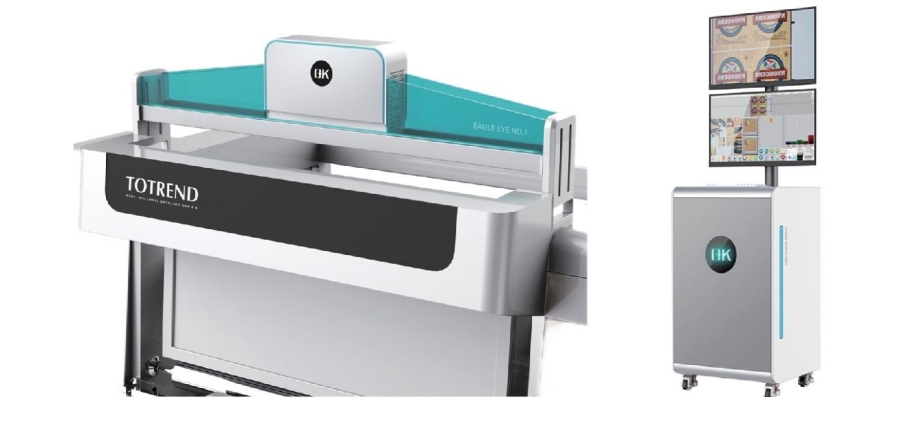
Implementation of Remote Monitoring and Diagnostics in Web Inspection Systems
Implementing remote monitoring and diagnostics in web inspection systems involves the integration of various technologies and methodologies to facilitate real-time monitoring, fault detection, and diagnostics from remote locations.
System Architecture
Hardware Components
Sensors and Cameras: High-resolution cameras and a variety of sensors (e.g., thickness, temperature, tension) should be installed along the web inspection line to capture detailed data.
Edge Devices: Utilize edge computing devices to preprocess data locally before transmitting it to the cloud or remote servers.
Connectivity: Ensure reliable connectivity via wired or wireless networks (e.g., Ethernet, Wi-Fi, 4G/5G).
Software Components
Data Acquisition System (DAS): Implement a DAS to collect and process data from sensors and cameras in real-time.
Remote Monitoring Software: Develop or integrate software platforms that enable remote access to inspection data, visual feeds, and system status.
Cloud Storage and Computing: Leverage cloud services for data storage, processing, and analytics.
Data Transmission and Storage
Secure Data Transmission
Encryption: Apply encryption protocols (e.g., SSL/TLS) to secure data during transmission.
VPN: Implement Virtual Private Networks (VPNs) to ensure secure remote access.
Data Storage
Cloud Storage: Store inspection data in the cloud for scalability and ease of access.
Redundancy: Implement data redundancy strategies to prevent data loss.
Real-Time Monitoring
Dashboard Development
Custom Dashboards: Create customizable dashboards that display key performance indicators (KPIs), real-time data, and alerts.
Visualization Tools: Employ graphical tools to visualize data trends, anomalies, and inspection results.
Alerts and Notifications
Automated Alerts: Configure automated alerts for deviations, anomalies, and faults.
Notification Channels: Use multiple notification channels (e.g., email, SMS, mobile apps) to ensure timely alerts.
Diagnostics and Analysis
Machine Learning and AI
Predictive Analytics: Implement machine learning algorithms to predict potential faults based on historical and real-time data.
Anomaly Detection: Utilize AI techniques to detect anomalies that signal potential issues.
Diagnostic Tools
Root Cause Analysis: Develop tools for root cause analysis to identify and address the underlying causes of faults.
Decision Support Systems: Utilize decision support systems to provide actionable insights and recommendations.
Remote Control and Intervention
Remote Control Capabilities
Remote Adjustments: Enable remote adjustments of inspection system parameters (e.g., camera focus, sensor calibration) to optimize performance.
Automated Corrections: Implement automated correction mechanisms that can be triggered remotely based on diagnostic results.
Security Measures
Access Control: Introduce robust access control mechanisms to restrict remote access to authorized personnel only.
Audit Trails: Maintain audit trails of remote access and interventions for accountability.
Integration with Enterprise Systems
ERP and MES Integration
Data Integration: Integrate inspection data with Enterprise Resource Planning (ERP) and Manufacturing Execution Systems (MES) for comprehensive workflow management.
Real-Time Updates: Ensure real-time updates and synchronization between web inspection systems and enterprise systems.

Training and Support
Training Programs
Remote Training: Develop remote training programs for operators and technicians to familiarize them with the remote monitoring and diagnostics system.
User Manuals and Documentation: Provide detailed user manuals and documentation for troubleshooting and system operation.
Technical Support
24/7 Support: Offer round-the-clock technical support to address any issues that may arise with the remote monitoring system.
Remote Assistance: Utilize remote assistance tools to provide real-time support and troubleshooting.
Conclusion
Remote monitoring and diagnostics for web inspection systems represent a significant advancement in manufacturing technology. By leveraging real-time data collection, advanced analytics, and predictive maintenance, companies can enhance product quality, increase operational efficiency, and achieve substantial cost savings. As industries continue to evolve, the integration of remote monitoring and diagnostics will undoubtedly become a standard practice, driving innovation and competitiveness in the manufacturing sector.
Polarimetry, a technique that measures the rotation of polarized light, plays a crucial role across various industries, including chemistry, pharmaceuticals, and food and beverage. Polarimeters are essential for determining the concentration, purity, and specific rotation of optically active substances. This article explores the practical applications of polarimeters and their significance in ensuring precision and accuracy across different fields.
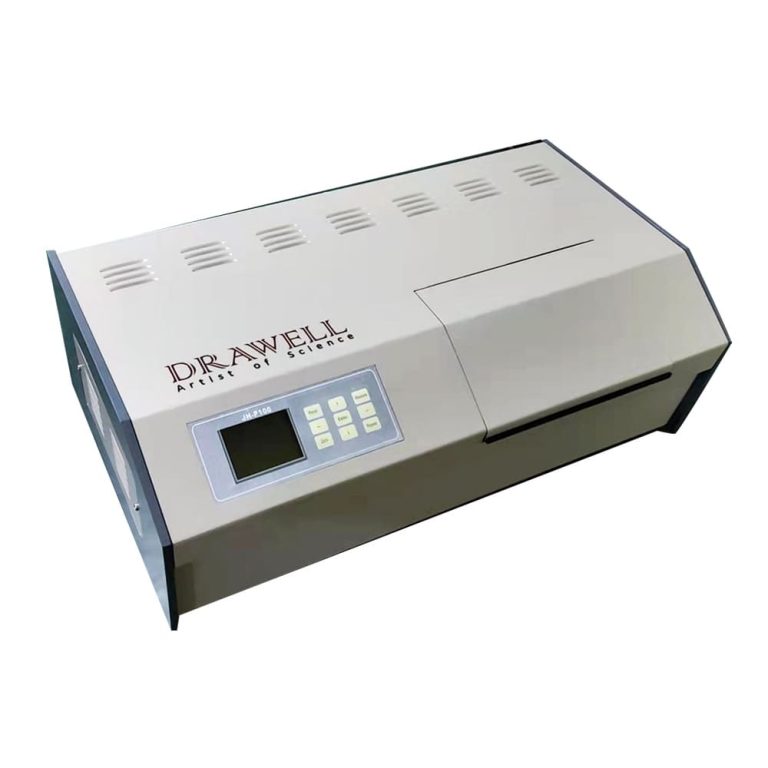
Understanding the Basics of a Polarimeter
A polarimeter is an instrument that measures the rotation of plane-polarized light as it passes through an optically active substance, which can be in liquid, solid, or solution form. The degree of rotation depends on the concentration of the optically active compound and the length of the sample tube. The specific rotation, a critical parameter obtained through polarimetry, acts as a unique identifier for substances and is vital in numerous analytical processes.
Key Components of a Polarimeter
Polarizer: The polarizer generates plane-polarized light by allowing only light waves oscillating in a specific plane to pass through, creating a uniformly polarized beam.
Sample Tube or Cell: This clear container holds the substance being analyzed. The tube’s length and the substance’s concentration influence the degree of light rotation.
Analyzer: Positioned after the sample tube, the analyzer is another polarizing element that can be rotated to detect changes in the light's orientation caused by the optically active substance.
Light Source: A stable light source, typically a sodium lamp, produces the light beam that passes through the polarizer, sample, and analyzer. The wavelength is usually standardized for consistent measurements.
Readout Scale: The polarimeter includes a readout scale or digital display to indicate the angle of the analyzer’s rotation, which is then used to calculate the specific rotation of the sample.
Wide Practical Applications of a Polarimeter
Applications in Chemistry
Chiral Molecule Analysis: Polarimeters are crucial for studying chiral molecules with optical activity, particularly in the pharmaceutical industry, where the purity and concentration of chiral compounds affect drug efficacy.
Quality Control in Chemical Manufacturing: Polarimeters provide real-time data on chemical solution composition, ensuring that products meet strict quality standards.
Applications in Pharmaceuticals
Drug Development and Formulation: Polarimetry assists in accurately formulating drugs with specific concentrations of active ingredients, vital for the efficacy and safety of pharmaceutical products.
Quality Assurance in Pharmaceutical Production: Polarimeters verify the purity of raw materials and monitor the consistency of final products during the quality assurance process.
Applications in the Food and Beverage Industry
Sugar Content Determination: Polarimeters are widely used to measure sugar content, especially in the production of beverages, jams, and confectionery, ensuring consistent sweetness and product quality.
Quality Control in the Brewing Industry: Polarimetry monitors sugar concentration during fermentation, ensuring the production of high-quality beverages.
Applications in Instrumentation and Technology
Automatic and Digital Polarimeters: Modern automatic polarimeters feature automation and digital enhancements for more efficient and accurate measurements, improving usability and reliability.
Temperature Control Systems: Many polarimeters include temperature control systems, crucial for accurate and reproducible measurements across varying temperatures.

Educational and Research Use
Polarimeters are invaluable in educational settings and research laboratories, where they help students and researchers understand optical activity and conduct experiments that drive scientific advancements.
Conclusion
Polarimeters are indispensable tools in ensuring accuracy, quality, and efficiency across various industries. From pharmaceutical research to food and beverage quality control, these instruments continue to be essential for professionals and researchers dedicated to precision and reliability.
Knurled screws are distinguished by their versatility and functionality, finding applications across a broad spectrum of industries. These unique screws are engineered not only to securely fasten components but also to provide enhanced grip and ease of handling. This article delves into the intricacies of knurled screws, exploring their types, materials, applications, and how to select the right one for your specific needs.

Functions of Knurled Screws
Knurled screws are characterized by their knurled or textured surface on the head, which features a series of small ridges or grooves. This knurling enhances the grip for fingers, making it easier to tighten or loosen the screw without additional tools. Beyond functionality, the knurling also adds to the aesthetic appeal of these screws, making them suitable for applications where both practicality and design are important.
Types of Knurled Screws
Knurled screws come in various types, each designed for specific applications:
Thumb Screws: Featuring an enlarged, knurled head, thumb screws allow users to tighten or loosen the screw using their fingers, eliminating the need for tools. They are commonly used in applications requiring frequent adjustments, such as electronic equipment and machinery.
Knurled Shoulder Screws: These screws have a knurled shoulder between the head and the threaded portion. The shoulder acts as a precise stopping point when the screw is inserted into a hole, ensuring consistent positioning.
Knurled Captive Panel Screws: Designed with a captive panel feature, these screws remain attached to the panel even when loosened, preventing loss and simplifying maintenance and assembly processes.
Knurled Weld Screws: These screws have a knurled shank designed for welding onto metal surfaces, providing a secure attachment point.
Knurled Knob Screws: These screws combine the functionality of a knob with a screw. The knurled knob offers a comfortable grip, while the screw portion secures the object in place.
Knurled Chicago Screws: Made from brass, these knurled chicago screws offer excellent wear resistance and high strength. They feature a standard slot for easy installation with a slotted screwdriver.

Materials Used in Knurled Screws
Knurled screws are made from various materials to suit different environments and applications:
Stainless Steel: Known for its corrosion resistance and durability, stainless steel knurled screws are ideal for applications exposed to moisture, chemicals, and varying temperatures.
Brass: Brass knurled screws offer excellent conductivity and are often used in electronics and decorative applications due to their appealing golden appearance.
Aluminum: Lightweight and corrosion-resistant, aluminum knurled screws are commonly used in applications that require reduced weight without compromising strength.
Plastic: Plastic knurled screws provide electrical insulation and chemical resistance, making them suitable for non-metallic environments, especially in electronics and healthcare industries.
Applications of Knurled Screws
The versatility of knurled screws makes them suitable for a wide range of applications:
Electronics: Widely used in electronic equipment assembly, knurled screws offer quick, tool-free access to internal components due to their enhanced grip.
Machinery: In the machinery industry, knurled screws are used to secure parts that require frequent adjustments, such as guides and clamps.
Furniture: Knurled screws are employed in furniture assembly, enabling easy installation and maintenance for pieces that may need periodic adjustments.
Automotive: Used in various automotive components, from interior panels to engine parts, knurled screws provide a secure grip and reliable performance.
Medical Equipment: In medical settings, knurled screws are used to assemble devices and equipment where hygiene, grip, and precision are crucial.
Choosing the Right Knurled Screws
Selecting the appropriate knurled screw for your application requires consideration of several factors:
Material: Choose a material suited to the environmental conditions the screw will face. Stainless steel is ideal for harsh conditions, while plastic is better for non-metallic environments.
Thread Type: Determine the appropriate thread type (e.g., machine, wood, self-tapping) based on the materials being joined and the required load-bearing capacity.
Size and Length: Ensure the screw’s size and length are compatible with the components being fastened. A screw that’s too short might not secure the hold, while one that’s too long could cause damage.
Head Type: Different applications may require specific head types, such as flat, round, or hexagonal heads. Consider the aesthetics and functionality required.
Knurling Intensity: The intensity of the knurled pattern affects the grip. Light knurling offers a more subtle grip, while heavy knurling provides a stronger grip.

Summary
Knurled screws are a unique subset of fasteners that blend functionality and aesthetics. Their knurled design enhances grip and ease of handling, making them a preferred choice across industries such as electronics, machinery, automotive, and furniture. With various types, materials, and sizes available, selecting the right knurled screw involves careful consideration of factors like material, thread type, size, head type, and knurling intensity. By making an informed choice, you can ensure that your fastening solution meets both practical and design requirements.
Oil and gas exploration and production are vital components of the global energy landscape, supplying the energy needed for industrial, commercial, and residential activities. This complex process involves searching for hydrocarbon reservoirs beneath the Earth's surface, extracting them, and processing them into essential energy resources.

Understanding the Processes of Oil and Gas Exploration and Production
The Exploration Process
Seismic Surveys
Seismic surveys are a crucial step in oil and gas exploration. By utilizing advanced technologies such as 3D and 4D seismic imaging, geophysicists can create detailed subsurface maps. These surveys generate shockwaves through controlled explosions or vibrations, with the reflections helping to identify potential hydrocarbon reservoirs.
Geological and Geophysical Studies
Understanding the geological and geophysical characteristics of a region is vital for identifying areas with potential hydrocarbon deposits. Geologists analyze surface rock formations, while geophysicists study subsurface structures using a variety of techniques to pinpoint likely reservoir locations.
Exploratory Drilling
Once a promising area is identified, exploratory drilling is initiated. This process involves drilling exploratory wells to confirm the presence of oil or gas. Advanced drilling technologies like directional and horizontal drilling enhance the accuracy and efficiency of this phase.
The Production Process
Reservoir Characterization
Before production can begin, it's essential to characterize the reservoir to determine its size, permeability, and other critical properties. This information is vital for developing an effective production strategy.
Drilling and Well Construction
To extract oil or gas, wells are drilled into the reservoir using drilling rigs and specialized equipment. Well construction involves installing casing and cementing to ensure stability and prevent environmental impact.
Enhanced Oil Recovery (EOR)
As reservoirs mature, traditional extraction methods may become less effective. EOR techniques, such as injecting steam, chemicals, or gases into the reservoir, are employed to increase recovery rates and extend the reservoir's life.
Surface Facilities and Processing
Extracted oil and gas contain impurities that must be removed before reaching consumers. Surface facilities, including separation units and processing plants, play a crucial role in purifying the hydrocarbons and separating oil, gas, and water.
Transportation and Distribution
After processing, the extracted oil and gas are transported to refineries and end-users. Pipelines, tankers, and, in some cases, liquefied natural gas (LNG) facilities are used to transport these valuable resources.
Challenges and Innovations in Oil and Gas Exploration and Production
Environmental Concerns
The oil and gas industry faces scrutiny due to environmental concerns. Innovations such as environmentally friendly drilling fluids, low-emission technologies, and sustainable practices are being developed to reduce the industry's environmental impact.
Digitalization and Automation
The integration of digital technologies, automation, and artificial intelligence is transforming the E&P sector. These innovations, ranging from smart drilling systems to data analytics for predictive maintenance, improve efficiency and reduce operational risks.
Renewable Energy Integration
With an increasing emphasis on renewable energy, oil and gas companies are exploring sustainable practices and investing in alternative energy solutions. Some companies are diversifying their portfolios by investing in renewable energy projects.
The Role of Simulation Technology in Oil and Gas Exploration and Production
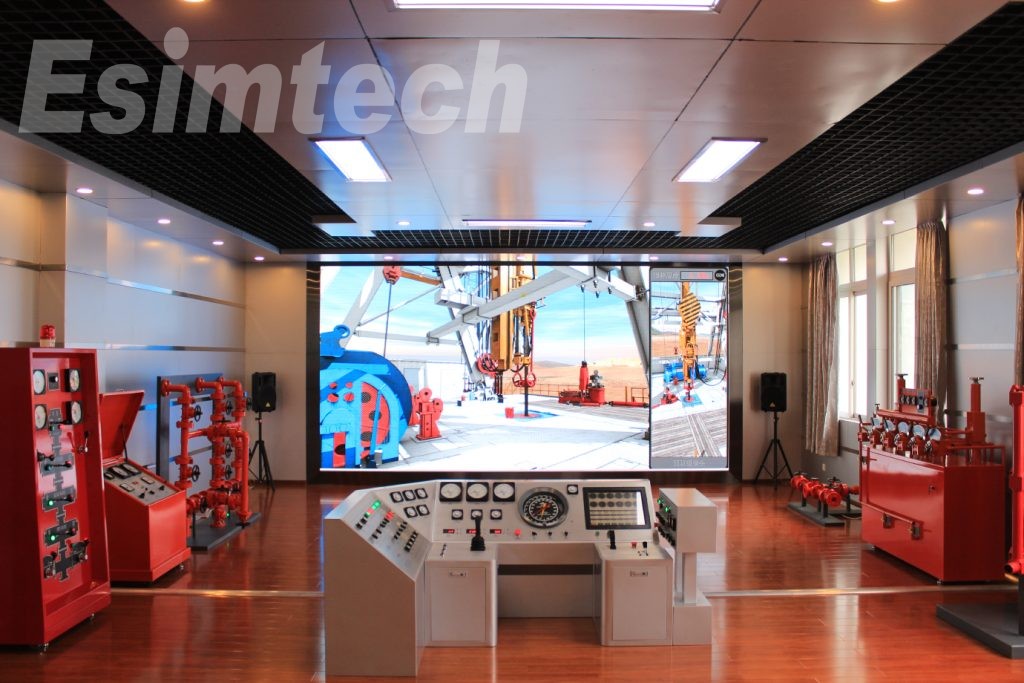
Simulation technology plays a crucial role in the E&P processes, providing valuable insights, enhancing decision-making, and optimizing various operations.
Reservoir Simulation
Reservoir simulation models the behavior of underground reservoirs to better understand fluid flow, pressure changes, and overall reservoir performance. Engineers use these simulations to predict reservoir behavior, optimize production strategies, and estimate ultimate recovery.
Drilling Simulation
Drilling and well control simulations are used to plan and optimize well trajectories, assess drilling risks, and simulate the response of drill strings and downhole tools. These virtual environments allow operators to train personnel, simulate challenging drilling scenarios, and improve overall drilling efficiency and safety.
Production System Simulation
Oil and gas production system simulation models the entire process, from the wellhead to the processing facilities, taking into account variables like flow rates, pressures, temperatures, and fluid compositions. By simulating the entire production system, operators can optimize processes, identify bottlenecks, and improve system efficiency.
Facilities and Processing Plant Simulation

Simulating processing plants and surface facilities is critical for optimizing the separation and treatment of oil, gas, and water. These simulations help design and optimize facility layouts, assess the impact of different processing scenarios, and identify potential issues before construction begins.
Enhanced Oil Recovery (EOR) Simulation
EOR simulation technology is valuable for designing and optimizing the process. By simulating the injection of steam, chemicals, or gases into reservoirs, engineers can predict the behavior of injected substances, optimize injection rates, and maximize oil recovery while minimizing costs.
Risk and Safety Simulations
Simulation is used to assess and mitigate risks associated with various exploration and production activities. Safety simulations help evaluate response protocols and train personnel by simulating emergency scenarios like blowouts or equipment failures, thereby improving readiness and overall safety.
Geological and Seismic Simulations
Simulating geological formations and seismic data helps in understanding subsurface structures and identifying potential hydrocarbon reservoirs. Advanced seismic simulations improve the imaging of subsurface structures, guiding exploration efforts and reducing the uncertainty associated with drilling decisions.
Digital Twin Technology
Digital twin technology involves creating a virtual replica of physical assets or processes. In the oil and gas industry, digital twins are used to monitor, analyze, and optimize operations in real-time, allowing operators to make informed decisions and respond to changes promptly.
Training Simulators
Simulation technology is extensively used for training purposes. Virtual reality (VR) and augmented reality (AR) simulations provide realistic training environments for personnel involved in drilling, production, and safety procedures, helping improve skills, enhance safety awareness, and reduce the learning curve for new technologies.
Data Analytics and Machine Learning
Combining simulation data with analytics and machine learning algorithms enables predictive modeling and optimization. Continuous analysis of simulation and real-time operational data allows companies to identify patterns, optimize processes, and make data-driven decisions, improving overall efficiency.
Conclusion
Oil and gas exploration and production are dynamic processes that demand advanced technologies, interdisciplinary expertise, and a deep understanding of geological and engineering principles. Simulation technology is a powerful tool in the E&P sector, enhancing decision-making, operational efficiency, and safety. As technology advances, the integration of simulations with other cutting-edge technologies is expected to play an even greater role in shaping the future of the oil and gas industry.
The user interface (UI) and usability of web guiding equipment are crucial components in ensuring efficient and precise operations across various industries. This article delves into the significance of user interface and usability in web guiding equipment, emphasizing key design principles and best practices.

Key Design Principles for User Interface in Web Guiding Equipment
The user interface of web guide system equipment significantly impacts the ease of use, operational efficiency, and overall user experience.
Simplicity and Clarity
Intuitive Navigation: The user interface should be designed with a clear and straightforward navigation structure, allowing users to find and access functions effortlessly, without the need for multiple steps.
Minimalism: Avoid overloading the interface with unnecessary elements. Keep screens uncluttered by including only essential components to prevent operator confusion.
Clear Labels: Use concise and unambiguous labels for buttons and controls to minimize misunderstandings and operational errors.
Consistency
Uniform Layouts: Ensure that the layout is consistent across different screens and functions. This helps users predict where to find specific controls or information, reducing the learning curve.
Standard Controls: Utilize standard control elements like buttons, sliders, and icons consistently throughout the interface. Familiar controls contribute to easier system navigation.
Feedback and Responsiveness
Real-Time Feedback: Provide immediate feedback for user actions, ensuring that changes made by the operator are reflected in real-time.
Status Indicators: Incorporate visual indicators, such as color changes, progress bars, or icons, to display the status of operations and highlight any errors or warnings, enabling operators to assess the system’s condition quickly.
Accessibility
Easy-to-Read Fonts: Select legible fonts with appropriate sizing to ensure readability from a distance, avoiding overly stylized fonts that may be difficult to read.
Contrast and Color Use: Maintain sufficient contrast between text and background colors. Use color coding thoughtfully to convey information, while considering color blindness.
Customization and Flexibility
Adaptable Interfaces: Allow users to customize the interface to their preferences or the specific requirements of different tasks. This can include adjusting layouts, changing color schemes, or configuring shortcuts.
Scalable Design: Design the UI to be scalable, adapting to different screen sizes and resolutions, ensuring a consistent user experience across various devices.
Safety and Error Prevention
Error Prevention: Implement features that help prevent errors, such as confirmation prompts for critical actions and input validation to avoid invalid entries.
Emergency Controls: Ensure that emergency stop buttons and clear instructions for handling emergencies are easily accessible and prominently placed.
Training and Support
Integrated Help: Embed help guides and tooltips within the UI to assist users in understanding functions and troubleshooting issues.
Training Modes: Provide a training mode that allows new users to familiarize themselves with the system without affecting actual operations, helping to build confidence and competence.
Performance and Efficiency
Optimized Workflows: Design workflows within the UI to minimize the number of steps required to complete common tasks, enhancing overall productivity.
Loading Times: Ensure that the UI is responsive with minimal loading times, as slow interfaces can frustrate users and impede productivity.
Feedback Collection and Iteration
User Feedback: Regularly gather feedback from operators to identify pain points and areas for improvement, guiding updates and enhancements to the UI.
Continuous Improvement: Continuously refine the user interface based on user feedback and technological advancements, regularly updating it to address emerging needs and incorporate new features that enhance usability.

Best Practices for Usability in Web Guiding Equipment
User-Centered Design
Understand User Needs: Conduct thorough user research to grasp the needs, skills, and limitations of operators, ensuring the design is tailored to their requirements.
Personas and Scenarios: Develop user personas and scenarios to guide design decisions, ensuring the system meets real-world use cases.
Intuitive User Interface
Clear Navigation: Create an intuitive navigation structure that allows users to find information and controls quickly, effectively using menus, tabs, and breadcrumb trails.
Consistent Layout: Maintain a consistent layout across all screens, helping users learn and predict interface behavior.
Effective Feedback Mechanisms
Immediate Feedback: Provide real-time feedback for user actions, using visual or auditory signals when a button is pressed or a setting is adjusted.
Error Messages: Design clear and informative error messages that guide users on how to correct mistakes.
Accessibility and Ergonomics
Readable Fonts and Colors: Use large, legible fonts and high-contrast color schemes to enhance readability, especially in varying lighting conditions.
Ergonomic Controls: Position controls and inputs within easy reach, ensuring they require minimal physical effort to operate.
Customization and Personalization
Adjustable Settings: Allow users to customize interface elements, such as font size, color themes, and layout preferences, to meet their individual needs.
User Profiles: Implement user profiles that save individual settings and preferences, offering a personalized experience.
Streamlined Workflows
Task Automation: Automate repetitive tasks to reduce user workload and minimize the risk of errors.
Guided Processes: Provide step-by-step guidance for complex tasks to ensure web guide systems are completed correctly and efficiently.
Safety and Security
Error Prevention: Design features that prevent common errors in web guide system, such as confirmation prompts for critical actions and input validation to avoid incorrect entries.
Emergency Controls: Ensure that emergency stop buttons and safety controls are prominently placed and easily accessible.
Training and Support
Integrated Help: Include contextual help and tooltips within the interface to assist users in understanding features and troubleshooting issues.
Training Resources: Provide comprehensive training materials, such as manuals, videos, and interactive tutorials, to help users become proficient with the equipment.
Performance Optimization
Responsive Design: Ensure the interface is responsive and performs well under various conditions, as slow response times can frustrate users and hinder productivity.
Efficient Workflows: Optimize workflows to minimize the number of steps required to complete tasks, enhancing overall efficiency.
Continuous Improvement
User Feedback: Regularly collect feedback from users to identify pain points and areas for improvement.
Iterative Design: Implement a continuous process of iteration and improvement based on user feedback and technological advancements.

The user interface and usability of web guiding equipment are pivotal in ensuring effective and safe operations. By focusing on principles like clarity, simplicity, consistency, feedback, responsiveness, and accessibility, manufacturers can develop user-friendly web guide systems that enhance operator performance and minimize errors. Implementing best practices such as user-centered design, comprehensive training, regular updates, customization, and ongoing testing ensures that web guiding control systems remain efficient, reliable, and adaptable to various industrial applications.