
Digital printing has transformed the print industry, providing unprecedented flexibility, speed, and cost-effectiveness. However, ensuring high-quality digital prints necessitates meticulous attention to various quality metrics. These metrics serve as benchmarks for assessing and maintaining print quality, guaranteeing that the final product meets the desired standards. This article delves into the essential metrics for evaluating digital printing quality, highlighting their importance and how they can be optimized.

Key Metrics for Evaluating Digital Printing Quality
Color Accuracy
Delta E (ΔE): A numerical representation of the difference between the intended color and the printed color. A lower ΔE value indicates higher color accuracy, with values under 3 generally considered acceptable in most applications.
Color Gamut: The range of colors a printer can produce. A wider color gamut ensures that the printer can reproduce a broader spectrum of colors, enhancing overall print quality.
Gray Balance: Ensures that neutral grays are printed without color casts, which is vital for maintaining the integrity of black-and-white images and neutral tones in color images.
Resolution and Detail
Effective Resolution: Refers to the actual resolution achieved on the printed material, which may differ from the nominal resolution due to various factors such as ink spread and media characteristics.
Linearity: The ability to reproduce fine lines and details accurately without distortion or blurring.
Registration Accuracy
Registration Tolerance: The allowable deviation from perfect alignment, typically measured in microns. Lower tolerance values indicate better registration accuracy.
Dot Gain/Spread: The increase in dot size as ink spreads on the paper, which can affect registration and overall print sharpness.
Ink Density and Coverage
Ink Density: Measured using densitometers or spectrophotometers, this metric ensures that the correct amount of ink is applied for each color.
forUniformity of Coverage: Assesses the evenness of ink distribution across the print, critical for large solid areas and gradients.
Surface Finish and Texture
Gloss Level: The amount of light reflected from the print surface, which can range from matte to high gloss. Consistent gloss levels across a print ensure a uniform appearance.
Surface Smoothness: Evaluated using techniques such as profilometry, this metric measures the micro-texture of the printed surface, impacting the visual and tactile experience.
Durability and Longevity
Lightfastness: The resistance of printed colors to fading when exposed to light, crucial for outdoor and archival prints.
Water and Scratch Resistance: Ensures that prints can endure handling and exposure to moisture without significant degradation.
Strategies for Optimizing Digital Printing Quality
Optimizing digital printing quality is crucial for achieving professional and high-quality prints that meet client expectations and industry standards. The following strategies focus on various aspects of the printing process, from equipment calibration to environmental control, to ensure superior print quality.
Regular Calibration and Maintenance
Printer Calibration: Regularly calibrate your printers using calibration tools and software. This helps maintain color consistency and accurate ink application.
Routine Maintenance: Perform routine maintenance, including cleaning print heads, checking ink levels, and inspecting mechanical parts. Regular upkeep prevents mechanical failures and print defects.
Color Management
ICC Profiles: Use International Color Consortium (ICC) profiles for accurate color representation. These profiles help manage color consistency across different devices and media.
Monitor Calibration: Calibrate monitors regularly to ensure that the colors displayed on the screen match the printed output.
Soft Proofing: Use soft proofing techniques to preview how colors will look when printed. This can help identify and correct color issues before printing.
High-Quality Media and Ink
Choose the Right Media: Select high-quality paper or other print media that is compatible with your printer and suitable for the specific job. The right media can enhance color vibrancy and detail.
Use High-Quality Inks: Use manufacturer-recommended inks to ensure compatibility and optimal performance. High-quality inks produce better color accuracy and longevity.
Resolution and Image Quality
Image Resolution: Ensure that your digital files have a resolution of at least 300 DPI for standard printing. Higher resolutions may be needed for large-format prints.
Effective Use of Software: Use photo editing and design software to enhance image quality. Correct issues such as noise, pixelation, and low resolution before printing.
Registration and Alignment
Registration Checks: Regularly check and adjust the registration settings on your printer. Ensure that color layers align perfectly to avoid any misregistration issues.
Dot Gain Control: Monitor and control dot gain, which can cause ink spread and affect sharpness. Adjust printer settings to compensate for dot gain and ensure crisp prints.
Ink Density and Coverage
Ink Density Settings: Adjust ink density settings according to the media being used. Use densitometers or spectrophotometers to measure and ensure correct ink application.
Uniform Coverage: Ensure uniform ink coverage to prevent issues such as banding and mottling. This is especially important for large solid areas and gradients.
Surface Finish and Texture
Consistent Gloss Levels: Maintain consistent gloss levels across prints to ensure a uniform appearance. Choose the appropriate gloss level (matte, satin, gloss) based on the desired outcome.
Smooth Surface: Ensure that the printed surface is smooth and free of imperfections. This can be achieved by using high-quality media and maintaining clean print heads.
Environmental Control
Optimal Conditions: Maintain optimal temperature and humidity levels in the printing area. Extreme conditions can affect ink drying and paper stability, leading to print defects.
Dust and Debris Control: Keep the printing area clean and free of dust and debris. Contaminants can cause print defects and damage equipment.

Quality Control and Testing
Regular Testing: Conduct regular test prints to check for color accuracy, resolution, and other quality metrics. Use these tests to make necessary adjustments.
Quality Assurance Procedures: Establish quality assurance procedures to monitor and maintain print quality. This can include visual print quality inspection system, automated quality checks, and feedback loops.

Conclusion
Maintaining superior digital printing quality involves understanding and optimizing various quality metrics. In a competitive market, excellence in digital printing quality metrics not only satisfies clients but also sets a benchmark for industry standards.
Advanced sensor technologies have revolutionized tension control systems by providing enhanced accuracy, real-time feedback, and adaptability to various materials and processes. This article explores the latest advancements in tension sensor technologies used in tension control systems, highlighting their principles, benefits, and applications.

The Critical Role of Tension Sensors in Tension Control Systems
Tension control systems are designed to maintain a constant tension in materials as they are processed. This is essential to prevent defects such as stretching, breaking, or wrinkling, which can compromise product quality. Effective tension control involves continuously monitoring the tension and making real-time adjustments to keep it within the desired range.
Tension sensors are the cornerstone of tension control systems. They provide the necessary feedback by measuring the tension and other relevant parameters of the material being processed. This data is then used to adjust the control mechanisms, ensuring that the tension remains consistent throughout the production process.
Advancements in Tension Sensor Technologies for Tension Control Systems
Load Cells
Principle: Load cells measure the force exerted by the material as it travels through the system, converting mechanical force into an electrical signal proportional to the tension.
Advantages:
High Accuracy and Sensitivity: Essential for maintaining consistent tension.
Real-Time Feedback: Instantaneous data allows for immediate adjustments, enhancing control and reducing errors.
Versatility: Available in a wide range of capacities to suit different materials and applications.
Applications:
Web Tension Control: Ensures uniform tension in paper and film production.
Wire and Cable Manufacturing: Maintains desired tension for quality control.
Textile Processing: Ensures consistent tension in fabric production processes.
Limitations:
Installation Complexity: Requires careful setup and calibration.
Mechanical Wear: Potential for wear and tear over time, necessitating maintenance.
Dancer Roll Systems
Principle: Utilizes a movable roller that adjusts its position based on the material’s tension. Sensors monitor the roller’s position, providing feedback to the control system to maintain consistent tension.
Advantages:
Simplicity and Effectiveness: Straightforward mechanism that effectively controls tension.
Smooth Adjustments: Provides continuous tension adjustments.
Flexibility: Suitable for various materials and operating speeds.
Applications:
Printing Presses: Maintains tension for high-quality prints.
Converting Processes: Used in laminating, coating, and other converting operations.
Laminating Operations: Ensures even tension during the laminating process.
Limitations:
Space Requirements: Requires adequate physical space for installation.
Mechanical Wear: Components may wear out over time.
Optical and Laser Sensors
Principle: Use light beams to measure the position and movement of the material. Variations in the material’s position or speed are detected, enabling precise tension control.
Advantages:
Non-Contact Measurement: Reduces wear and maintenance.
High Precision: Offers excellent accuracy and fast response times.
Versatility: Suitable for measuring delicate or high-speed materials.
Applications:
Thin Film Production: Ensures precise tension in thin film materials.
High-Speed Printing: Maintains tension in fast-paced printing processes.
Textile Manufacturing: Used for inspection and quality control.
Limitations:
Environmental Sensitivity: Performance can be affected by dust, light, and other environmental factors.
Higher Initial Cost: More expensive compared to traditional sensors.

Ultrasonic Sensors
Principle: Emit high-frequency sound waves to measure the distance to the material. Changes in the distance indicate variations in tension, which are used to adjust the control systems.
Advantages:
Non-Contact and Non-Destructive: Avoids damage to materials.
Insensitive to Material Properties: Effective regardless of material color and transparency.
Durability: Performs well in harsh environments.
Applications:
Paper Production: Maintains tension in paper manufacturing.
Textile Processing: Ensures consistent tension in fabric production.
Metal Strip Production: Controls tension in metal processing.
Limitations:
Range and Resolution: Limited measurement range and resolution compared to other sensors.
Interference: Can be affected by external noise.
Capacitive Sensors
Principle: Detect changes in capacitance between the tension sensor and the material. Variations in material thickness, position, or tension alter the capacitance, providing feedback for tension control.
Advantages:
High Sensitivity: Detects subtle changes in material properties.
Non-Contact Measurement: Minimizes wear and maintenance.
Effectiveness with Thin Materials: Suitable for measuring thin and lightweight materials.
Applications:
Thin Film and Plastic Extrusion: Maintains tension during extrusion processes.
Coating Processes: Ensures even tension in coating applications.
Semiconductor Manufacturing: Used for quality control in semiconductor production.
Limitations:
Environmental Sensitivity: Performance can be influenced by humidity and temperature changes.
Calibration Needs: Requires precise calibration and setup.

Conclusion
Advanced tension sensor technologies are integral to modern tension control systems, providing precise and reliable measurement capabilities essential for maintaining product quality and optimizing production processes. Load cells and dancer roll systems offer robust solutions for various materials and speeds, while optical, laser, ultrasonic, and capacitive sensors provide non-contact alternatives with high accuracy and fast response times. Selecting the appropriate sensor technology depends on specific application requirements, environmental conditions, and material characteristics, ensuring optimal performance and control.
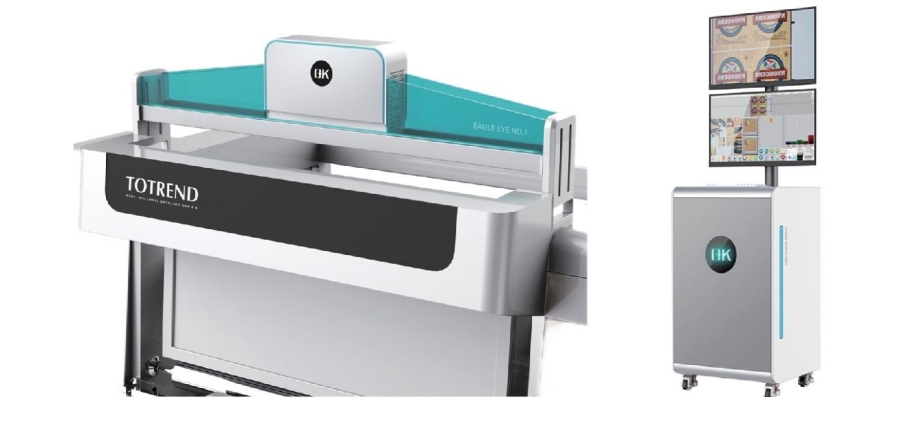
Digitalization is revolutionizing the printing and packaging industry, enhancing traditional processes and introducing new levels of efficiency and precision. A significant advancement in this context is the digitalization of print inspection, which is profoundly improving how print quality is monitored, controlled, and assured, resulting in superior output and reduced waste.
Key Components of Digital Print Inspection
Digital print inspection is a sophisticated process that leverages advanced technologies to ensure the highest quality in printed materials.
1. High-Resolution Cameras
Functionality:
Capture detailed images of printed materials at high speeds.
Detect minute defects that might be missed by the naked eye.
Features:
High Resolution: Enables detection of fine details and small defects.
Speed: Inspects large volumes of print quickly, suitable for high-speed printing processes.
Versatility: Adjustable to different types of printing substrates and conditions.
2. Image Processing Algorithms
Functionality:
Analyze images captured by the cameras in real-time.
Compare captured images against pre-defined standards or templates to identify defects.
Features:
Real-Time Analysis: Provides immediate feedback, allowing for quick corrections.
Defect Detection: Identifies various issues, including color variations, misregistrations, smudges, and surface imperfections.
Precision: Ensures high accuracy in identifying defects, minimizing false positives and negatives.
3. Artificial Intelligence (AI) and Machine Learning (ML)
Functionality:
Enhance inspection systems' capability to learn from past data and improve over time.
Predict potential issues and adapt to new types of defects.
Features:
Learning Capabilities: Systems improve accuracy and efficiency with use.
Predictive Analysis: Anticipates defects before they become significant problems.
Adaptive Algorithms: Adjusts to changing print conditions and defect types, maintaining high inspection standards.
4. Data Integration and Analytics
Functionality:
Integrate printing quality inspection systems with other digital tools and platforms for comprehensive data collection and analysis.
Provide insights into the printing process, helping optimize workflows and improve quality control.
Features:
Comprehensive Data Collection: Detailed data on every aspect of the print process.
Analytical Tools: Analyzes data trends, identifies recurring issues, and suggests improvements.
Real-Time Monitoring: Continuous monitoring and reporting facilitate proactive management of the print process.
5. User Interfaces and Software
Functionality:
Provide an interface for operators to interact with the inspection system, review defects, and manage settings.
Software platforms facilitate the setup, control, and analysis of the inspection process.
Features:
User-Friendly Interfaces: Intuitive interfaces for quick understanding and usage.
Customizability: Systems tailored to specific user needs and printing conditions.
Comprehensive Reporting: Detailed reports on inspection results aid decision-making and process improvements.
6. Lighting System
Functionality:
Provide consistent and appropriate lighting to ensure high-quality image capture by the cameras.
Different types of lighting can be used depending on the material and type of defects being inspected.
Features:
Uniform Illumination: Consistent lighting across the entire print area, avoiding shadows and glare.
Adjustable Lighting: Can be adjusted to suit different materials and inspection requirements.
Specialized Lighting: Techniques like UV or infrared lighting can highlight specific types of defects.
7. Motion Control Systems
Functionality:
Ensure precise movement and positioning of the print media under the inspection cameras.
Synchronize the inspection process with the printing process.
Features:
Precision: High accuracy in positioning, critical for detailed inspection.
Synchronization: Keeps the inspection process aligned with the speed and flow of the printing process.
Flexibility: Can handle different sizes and types of print media.
Challenges and Future Prospects in Digital Print Inspection
Challenges in Digital Print Inspection
High Initial Investment:
Cost Barrier: Advanced technology and equipment involve significant upfront costs, challenging for small to medium-sized printing companies.
Return on Investment (ROI): Justifying the ROI can be difficult if existing inspection methods are still acceptable.
Integration with Existing Systems:
Compatibility Issues: Integrating new digital inspection systems with legacy equipment and software can be complex, requiring significant modifications.
Operational Disruption: The integration process can disrupt ongoing operations, leading to downtime and temporary productivity losses.
Complexity and Usability:
Training Requirements: Advanced systems require specialized knowledge and skills, necessitating comprehensive training programs.
User Interface: Ensuring systems are user-friendly and intuitive is critical, as complex interfaces can hinder effective usage.
Data Management:
Volume of Data: Digital inspection systems generate large volumes of data, requiring effective management and analysis.
Data Security: Protecting sensitive production data from cyber threats requires robust cybersecurity measures.
Rapid Technological Advancements:
Keeping Up: Fast-paced technological advancements mean systems can quickly become outdated, necessitating continuous updates and investments.
Standardization: Lack of standardization in digital inspection technologies can lead to compatibility and interoperability issues.
Future Prospects in Digital Print Inspection
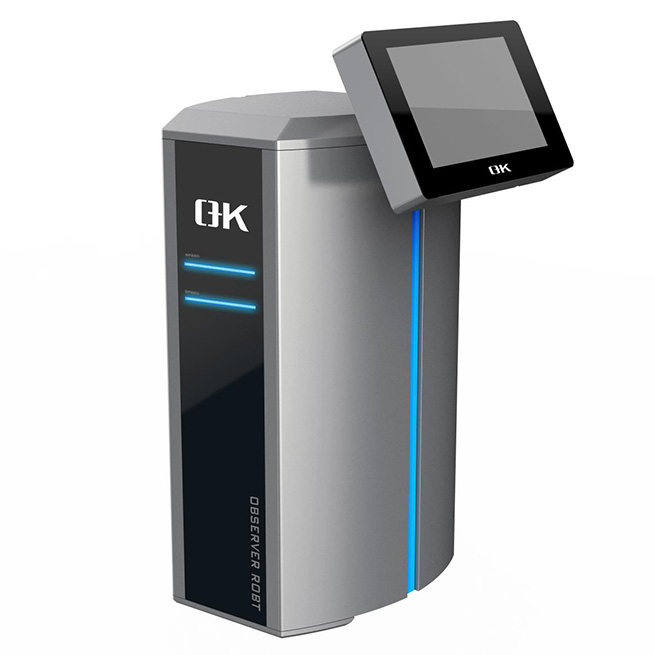
The future of digital print inspection is promising. Advancements in AI and machine learning will continue enhancing system capabilities, enabling more precise and efficient inspections. Integrating print inspection data with other Industry 4.0 technologies, such as the Internet of Things (IoT) and blockchain, could offer unprecedented levels of traceability and transparency.
Conclusion
The digitalization of print inspection represents a significant leap forward for the printing industry, offering numerous advantages in accuracy, efficiency, and cost-effectiveness. Digital print inspection plays an increasingly vital role in ensuring high standards of print quality, driving innovation, and maintaining competitiveness in a fast-paced market.
In the heart of various industries, precise tension measurement reigns supreme for safety and efficiency. But what happens when the environment throws a curveball? How do we ensure reliable readings when scorching temperatures and harsh conditions are the norm? Enter tension amplifiers, specially designed to conquer these challenges and provide unwavering accuracy.

The Amplification Advantage
Tension amplifiers act as the voice for tension sensors and load cells. These sensors detect the force exerted on materials and translate it into electrical signals. The amplifier's role is to amplify these signals, making them loud and clear for control systems to interpret. This process is vital for precise measurement and control, especially in unforgiving environments where even minor fluctuations can have significant consequences.
Conquering the Challenges: Strategies for Extreme Environments
High temperatures and harsh environments pose unique threats to tension amplifiers. Here's a breakdown of the challenges and how these resilient devices rise above them:
Thermal Stress: The culprit behind two main issues:
Signal Drift: Temperature fluctuations can cause the electrical signals to wobble, leading to inaccurate readings.
Material Fatigue: Repeated thermal cycling weakens materials over time, potentially causing breakdowns.
The Mitigation Strategy:
Heat-resistant Materials: Calling upon the likes of ceramics and specialized alloys to withstand the heat.
Thermal Management Systems: Heat sinks and cooling fans keep things cool, ensuring stable operation.
Corrosion and Contamination: Industrial environments are battlegrounds for tension amplifiers, constantly bombarded by:
Corrosion: Chemical reactions with moisture and pollutants can eat away at metals and electronics.
Contamination: Dust and debris can infiltrate sensitive parts, disrupting readings or causing malfunctions.
The Mitigation Strategy:
Shields Up!: Anti-corrosive coatings and sealants create a protective barrier.
Sealed Housings: Keeping contaminants at bay with a tightly sealed design.
Mechanical Stress: Vibrations and shocks, frequent companions of high-temperature environments, can wreak havoc on tension amplifiers:
Disrupted Signal Integrity: Mechanical movements can introduce noise and errors into the signal processing.
Component Damage: Prolonged exposure can physically damage the amplifier and its components.
The Mitigation Strategy:
Vibration Damping: Special materials and reinforced housings absorb and distribute the stress.
Design Enhancements: Clever engineering helps the amplifier handle the mechanical beating.
Electromagnetic Interference (EMI): Strong electromagnetic fields, a common presence in industrial settings, can disrupt electronic devices:
Noise in Signals: EMI injects noise, leading to distorted or inaccurate readings.
Component Failure: Prolonged exposure can damage electronic components.
The Mitigation Strategy:
EMI Shielding: The amplifier gets a suit of armor to deflect EMI.
Advanced Filtering Techniques: Filtering out the noise to ensure a clear signal.
Calibration and Maintenance: Keeping tension amplifiers in top shape can be tricky in harsh environments:
Accessibility Issues: Deep-sea locations or high-altitude areas can be difficult to reach for regular maintenance and calibration.
Dynamic Conditions: Constant changes in temperature and load necessitate frequent recalibration for accuracy.
The Mitigation Strategy:
Self-calibration Systems: The amplifier adjusts itself automatically to changing conditions.
Remote Monitoring and Calibration: Technology allows for adjustments to be made from afar.
Longevity and Reliability: Harsh environments can significantly shorten the lifespan of tension amplifiers, leading to:
Frequent Replacements: Reduced reliability means more frequent replacements, which can be costly.
Downtime: Failure of tension amplifiers can cause unplanned downtime, affecting productivity.
The Mitigation Strategy:
Durable Materials: High-quality materials designed to withstand extreme conditions.
Predictive Maintenance: Techniques anticipate and prevent failures before they happen.

Applications: Where Tension Amplifiers Shine in Extreme Environments
From the soaring heights of aerospace to the crushing depths of the ocean, tension amplifiers are essential players in various industries:
Aerospace: Monitoring the structural integrity of aircraft and spacecraft components that endure high temperatures, vibrations, and mechanical stress.
Automotive Industry: Ensuring proper tension in belts, chains, and exhaust system components that operate under extreme heat and vibrations.
Manufacturing: Precise control and measurement of tension in metal forming, extrusion, and molding processes involving high temperatures and mechanical forces.
Energy Sector: Monitoring tension in turbines, reactors, drilling equipment, and pipelines exposed to high temperatures, harsh mechanical conditions, and potential corrosion.
Mining and Heavy Equipment: Maintaining the integrity of critical components in heavy machinery used under harsh environmental conditions and significant mechanical loads.
6. Marine and Offshore
Subsea and Marine Operations: In marine and offshore environments, tension amplifiers are essential for monitoring the integrity of subsea equipment and structures.
High Pressure and Corrosion: Subsea environments involve high pressures and exposure to corrosive seawater.
Mechanical Stress: Continuous mechanical loads from waves and underwater currents.
Applications
Subsea Pipeline Monitoring: Ensuring the structural integrity of pipelines and risers under extreme conditions.
Marine Cables and Mooring Systems: Monitoring tension in cables and mooring systems to prevent failures and ensure safety.
7. Industrial Robotics
Precision Control in Harsh Conditions: Industrial robots often operate in environments where precision and reliability are crucial despite harsh conditions.
Thermal and Mechanical Stress: Robots in manufacturing processes may encounter high temperatures and mechanical loads.
Environmental Exposure: Exposure to dust, chemicals, and moisture.
Applications
Robotic Arm Tension Control: Ensuring precise movement and operation of robotic arms under various conditions.
Automated Assembly Lines: Monitoring tension in components handled by robots to maintain quality and efficiency.
Conclusion
Tension amplifiers designed for high-temperature and harsh environments are crucial for ensuring accurate, reliable measurements in industries where precision is non-negotiable despite extreme conditions. Through innovative materials, robust construction, and advanced technology, these devices provide the resilience and performance needed to meet the demanding requirements of modern industrial applications.
The web guide system is an indispensable part of industrial automation, primarily used for the automatic detection and adjustment of lateral deviations of conveying materials on production lines. This ensures product quality and production efficiency. Proper installation and debugging of the web guide system are crucial for its normal operation. This article discusses the installation steps, debugging methods, precautions during installation and debugging, as well as the daily maintenance of the web guide system.
Detailed Installation Steps of the Web Guide System
Preparation Stage
Tasks: Prepare all necessary tools and accessories. Check the foundation's firmness according to design requirements.
Installation Phase
Installing Sensor: Follow the instructions to fix the web guide sensor in the appropriate position, ensuring it can accurately detect the position of the coil.
Installing the Driver: Position the driver suitably and connect all wires and pipelines.
Installing Actuator: Usually a hydraulic or electric actuator needs to be installed where it can adjust the web materials.

Connection Stage
Electrical Connection: Connect the power and signal lines correctly according to the drawings and manual.
Hydraulic or Pneumatic Connection: For hydraulic correction systems, connect oil and gas pipes to ensure a smooth flow of the medium.
Debugging Methods of Web Guide Systems
Checking Wiring: Ensure all wiring is correct, especially the signal wires of sensors and the control wires of actuators.
Parameter Setting: Set appropriate parameters based on the production line's specific situation, such as sensor thresholds and actuator speeds.
System Testing: Test the web guide system in an actual production environment to observe its effectiveness in correcting coil deviations. Conduct tests under no-load or light load conditions.
Fault Diagnosis: Identify and repair potential issues if the system does not work during testing.

Precautions for Installation and Debugging
Preparation Before Installation:
Ensure all components and accessories are complete. Inspect the equipment for damage from transportation. Prepare suitable installation tools and necessary auxiliary equipment.
Basic Preparation and Installation:
Construct the foundation according to the manufacturer's basic drawings. Ensure the web guide machine is placed on a sturdy and flat surface. Stability is crucial for normal operation and longevity.
Electrical System Connection:
Connect the electrical system, including the motor, sensors, and control panel. Check for correct electrical connections to ensure proper power-up. Adhere to wiring specifications to avoid electrical faults.
Debugging Steps:
Adjust the mechanical transmission system, including gears, chains, and belts. Conduct a test run to check if all web guiding roller frames work properly without any load. Gradually increase tension and speed, checking the equipment's guiding effect and making necessary adjustments.
Common Fault Analysis and Solutions:
Address faults like slow guiding response or low accuracy. Perform fault analysis and timely solutions, such as cleaning or replacing the electric eye if its sensitivity decreases.
Daily Maintenance of the Web Guide System
Regular Inspections:
Conduct regular inspections, including appearance checks, working status confirmation, and functional testing of components. Ensure the power switch, indicator light, and coordination between the electric eye and motor are normal.
Cleaning Work:
Regularly clean dust and impurities from the machine. Avoid using hard objects to prevent damage during cleaning.
Lubricating Maintenance:
Regularly add lubricating oil to moving parts such as gears, bearings, and screw rods to reduce friction and wear.
Environmental Maintenance:
Install the system in a dry, dust-free, and corrosion-free environment. Avoid extreme temperatures for prolonged periods.
Safety Requirements:
Implement a fixed person and machine system and a shift handover protocol. Familiarize personnel with the maintenance structure and comply with operating procedures.

Summary
The installation and debugging of the equipment in a web guide system are complex processes that require comprehensive consideration of various factors, including physical installation, electrical connections, and parameter settings. Through strict debugging and testing, the web guide machine can maximize its efficiency in production, improving product quality and production efficiency.